"Blind Shipment" Functionality
This feature is designed for scenarios where a broker or shipper needs to hide the true source or destination of a shipment—such as a direct-from-supplier order—while maintaining accurate backend data.
This feature is designed for scenarios where a broker or shipper needs to hide the true source or destination of a shipment—such as a direct-from-supplier order—while maintaining accurate backend data.
- Custom Address Aliases: You can now add an Alias Name and address detail within the Address UI.
- Visual Indicators: A new indicator has been added to the Stop section to clearly identify when a stop is marked as "Blind."
- Automatic Accessorials: When a blind shipment is selected, the system will automatically add the corresponding accessorial to the Bill of Lading (BOL).
- Document Masking: The BOL will now display the Alias name and address instead of the actual pickup or delivery location.
Users can either save an Alias address directly within an address record or enter it on the fly while building a shipment. To do this, click the address book icon in the address field. From there, select **Blind Shipment**, and the Alias address will be automatically applied to the Bill of Lading (BOL) documentation (a Blind Shipment designation automatically creates a 2nd BOL with the Alias address).
Step 1:
- Select the Edit button in Address
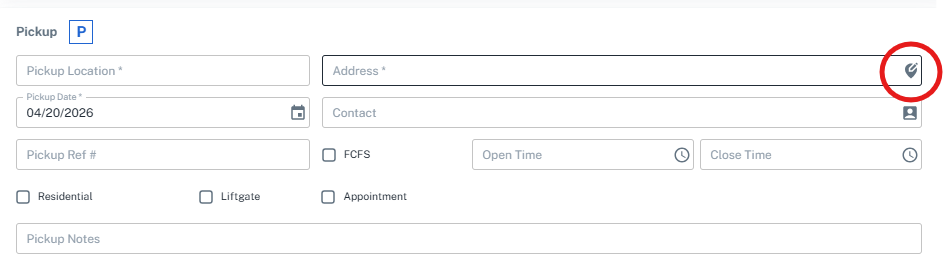
Step 2:
- Select the Blind Shipment checkbox, and then enter the Alias Address
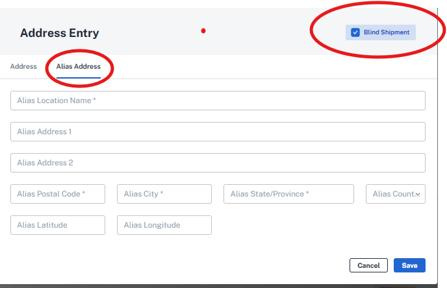
Step 3:
- When printing the BOL, the first one will have the actual PU and Destination. The second BOL will utilize the Alias.