To create one:
- Create a Custom Freight Agreement
- Agreement>Freight>Create New>Custom
- Determine if the agreement is Blanket Billing or Client Billing as the agreement type
- Blanket = applies to everyone
- Client = applies to a specified client only
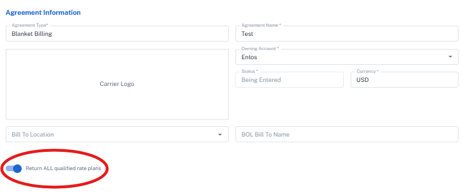
- Enter the required Owning Account and Agreement Name, leave Client blank because this is a blanket agreement, and set an Effective Date
- Activate the Return ALL qualified rate plans if needed
- On: G2Mint continues evaluating the agreement’s rate plans and returns all plans that qualify
- Off: G2Mint stops searching as soon as it finds the first qualified rate, so the order of the rate plans matters
- Configure the rate details and any applicable accessorial table; an accessorial agreement must be created first and assigned to the carrier before it can be added
- Upload functionality is available for Point to Point
- Charge Types are sorted by Fixed or Tiered
- If adding Coverage Area's, areas must be created in the Configurations section prior to adding to an agreement
- Set the agreement status to In Production so it can return rates
- Create a Shipment/Quote to test Rates to ensure accuracy