Last Updated: 9/1/2025
Applies to:
Shippers, Brokers, Carriers
Solution Overview:
The app customization setting allows you to upload your logo, change the color scheme, and the text size within your G2Mint account. Customizations will be displayed throughout the application and your logo can then appear on key shipping documentations such as your BOL.
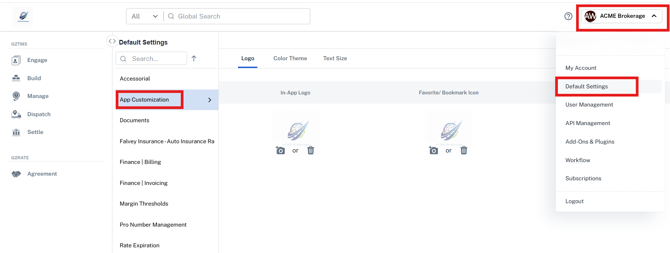
- Access this section by clicking on your account name in the upper right hand corner and select Default Settings, then Select App Customization.
- Within the App Customization section, you can then click on the Logo tab, and choose to upload your logo to apply to the application (this will replace the default G2Mint icon), the bookmark icon, and your documents.