What's New in This Release?
We're excited to announce the latest updates to G2Mint designed to enhance your experience and provide you with even more value. This release includes a range of new features, improvements, and bug fixes that address your feedback and our ongoing commitment to innovation.
Release Notes |
|---|
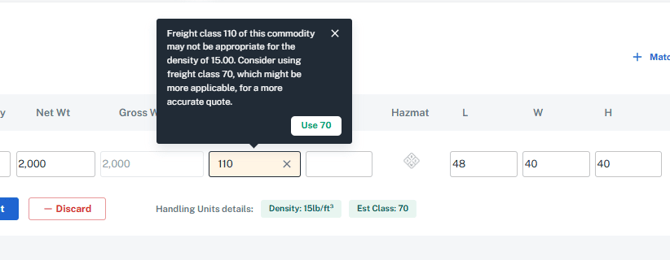
G2M-3288: Enhancement for Estimated Class logicThis enhancement provides users to be aware of Estimated Class BEFORE they click "Ship It" button. Previously, estimated Class was being calculated, but was unable to be viewed until AFTER clicking "Ship It." Key Points:
 |
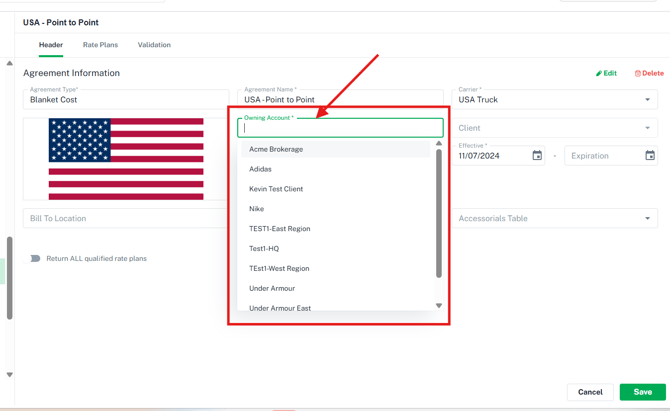
G2M-3963: Freight Agreement EnhancementsWe have updated the logic for Owning Accounts on Freight Agreements to provide more flexibility and accuracy in financial documentation. Brokers can now add and manage agreements owned by their clients. This change ensures that the "Bill To" details on awarded shipments correctly reflect the specific account responsible for the agreement. Key points:
Upon entering a new agreement or editing an existing agreement, you can now choose an owning account. This field will list you as the Broker or Shipper and any of your customer accounts setup on the account.
|
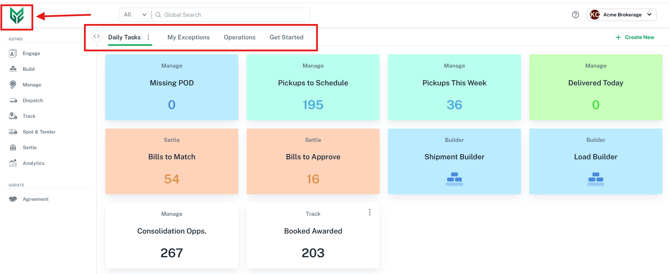
G2M-3281: Home View - Add default quick nav tilesWe’ve transformed the Quick Nav view into a functional home screen for new users to ensure a seamless first-day experience.
|
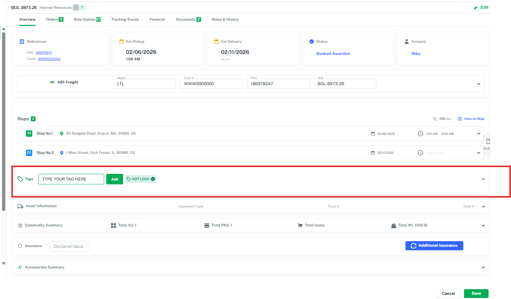
G2M-3942: Adding Tags to Shipments and Loads
|
Carrier Related Enhancements and Improvements:
Release Note |
|---|
|
New Carriers enabled for webservices: ✓ Performance Freight Systems
These carriers are all ready to be enabled on your G2Mint account to get your contracted rates, schedule pickups, receive tracking and documentation via webservices! Go to Agreements>Freight and click the 'Create New' button, choose 'Webservices' to add a new Web Service carrier Note: G2Mint is always expanding our carrier connections, if you don't see your carrier listed please reach out to support@G2Mint.com and we can add them to our backlog for future connections if they are not already on the roadmap. |
Enhancements to Existing webservices supported carriers:
|
We've addressed the following issues in this release:
Release Note |
|---|
|
G2M-4127: Addressed an issue where Shipper Guest were receiving unnecessary warnings about custom Equipment Types |
|
G2M-4142: Added a new warning message to help ensure users do not add a booked shipment to a load. |
|
G2M-3815: Improved the refresh process when performing actions throughout the application to eliminate manual refreshing and reduce unnecessary clicks. |
Provide Your Feedback:
Your input is invaluable as we continue to evolve. If you have any questions, suggestions, or encounter any issues, please don't hesitate to reach out to our support team at support@G2Mint.com
Thank you for being a valued customer!
Sincerely,
The G2Mint Team