Skip to content
English
  • There are no suggestions because the search field is empty.

G2Mint Release Notes: June 7th 2026

Version: 26.10

 
New Features

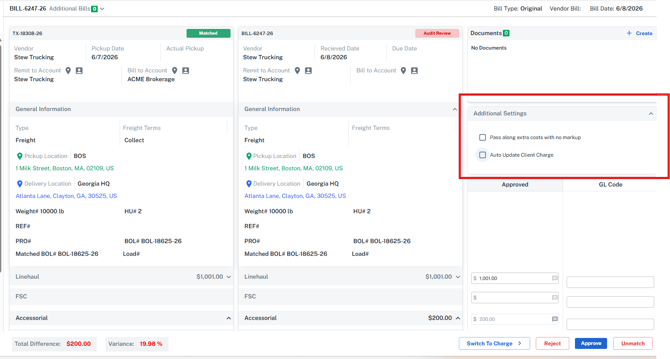
[G2M-4418] Bill Audit - Approve and Update Charge

This update introduces a new Additional Settings section during bill approval to automatically pass unexpected carrier bill variances onto the customer charge, ensuring margin protection without requiring manual updates. 

  • Added an "Auto Update Client Charge" toggle that recalculates the client charge using the approved amounts and the original awarded markup rate.

  • Added a "Pass along extra costs with no markup" toggle that automatically adds the exact cost difference to the charge record.

  • Configured the system to automatically generate a supplemental invoice if the associated customer charge has already been converted to an invoice in processing status.

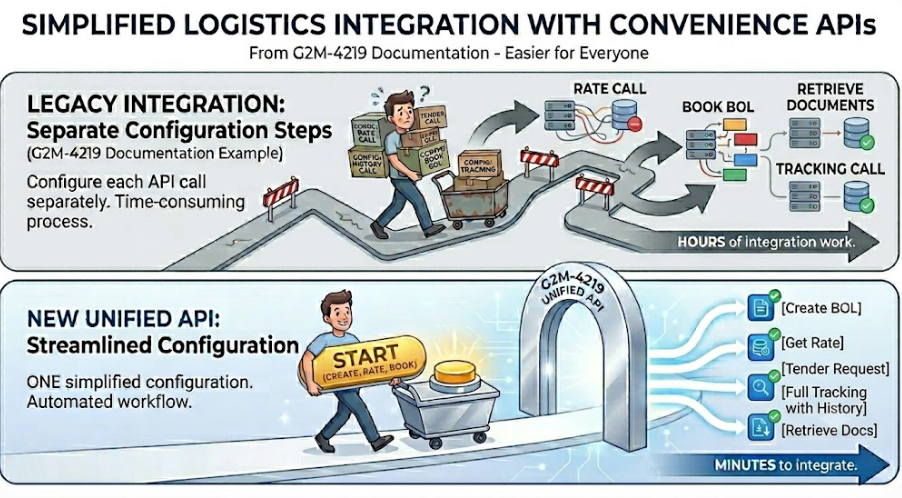
G2M-4219 Documentation - Rate API Enhancements/Convenience APIs

The application introduces a new set of convenience APIs and expanded documentation designed to simplify integration logic for customers utilizing our systems. This update streamlines common workflows by combining multi-step operations into singular API endpoints and outlining clear, predictable rules for data entry. 

  • Introduced unified endpoints for Create and Rate, Tender, Tracking with history, and a combined Create, Rate, and Book BOL API that manages complex multi-step processes through synchronous, asynchronous, or webhook methods.

  • Expanded setup guides with clear instructions on data requirements and acceptable values to prevent broken code, eliminate guessing, and ensure faster, successful integrations.

G2M-4232 Financial Grid Enhancements

This update adds additional fields to, introduces new filtering options, and gives users deeper control over their financial information layout.

General Filter Changes:

  • Added a "Does not Contain" text filter option to the Owning Account and Client Account columns

  • Added a "Between" date range operator for all date fields, and resolved issues with multi-status selection filters. 

Expected Costs

  • Added new visibility fields for Payable Status, Client Account, Carrier Name, and Total Linehaul Gross.
  • Now displaying the actual pickup date on the cost record next to the requested pickup date.
  • Added direct link to open up the shipment details from both the audit screen and expected cost sections.
  • Added an 'Unmatch' button to completely disassociate cost and bill records.

Bills

  • Added new visibility fields for Payable Status, Client Account, Carrier Name, Total Linehaul Gross, Approved Date, Bill To fields, and Due Date.
  • Corrected automated invoice due dates to calculate based on specific carrier net-terms settings.

Payables

  • Added new visibility fields for Freight Type (Commission vs Freight expense, etc..), Client Account, Total Cost, Savings (Difference between the carrier bill and final payable), Quick Pay Due Date, Quick Pay (True/False), Owning Account, and the associated Statement Name (used to help tie payables back if you are consolidating client invoices into a statement).
  • Updated data mapping rules so that billing locations and owning accounts align with the original Bill of Lading on the shipment.

Remittance

  • Added new visibility fields for Bill To fields, Remittance Date, and Carrier Name across both the main grid and the details screen.
  • Enabled direct inline editing for the Remittance Date field and added Bill numbers to the Remittance detail grid.
  • Configured the Remittance detail screen to automatically remember and save user column preferences. Allowing you to customize what information you want to see and send to your carrier when sending payments.

Expected Charges

  • Added new visibility fields for Payable Status, Payable Total, and Profit.

Invoices

  • Added new visibility fields for Sent Date, Profit, Invoice Date, Due Date, Statement Date, and Payable Approval Date.
  • Enabled direct inline editing for the Statement Date field.


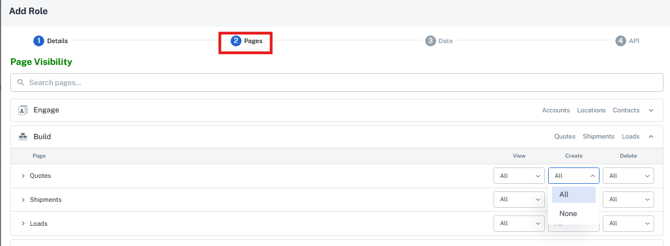
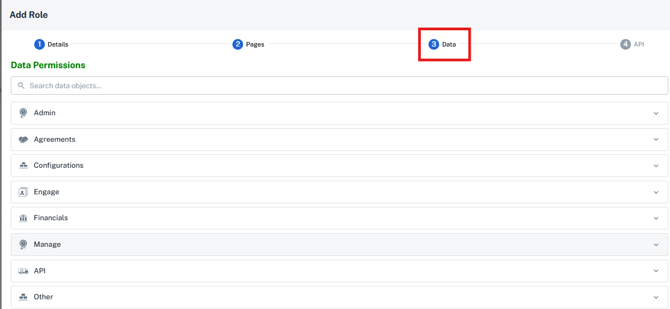
[G2M-4288] Customized Roles - Permission by pages

This update introduces a dynamic and highly configurable roles interface that gives customers granular control over user permissions.

  • System administrators can now customize user access at the page level permissions based on core personas, restricting specific pages, tabs, and accordions while ensuring essential backend processes remain operational.

  • Additionally, within the pages you can also designate specific data level permissions to enable read-only vs. edit access to all records or only the ones in which they are assigned to or create.

If you have a unique permission structure or a specific role configuration you would like to set up for your team, please reach out to our support team at support@G2Mint.com and we can help you get started!  

[G2M-4414] Receive Updates from QuickBooks - Mark Paid

This update enhances the QuickBooks integration by enabling real-time payment data synchronizations from QuickBooks directly back into G2 for both vendors and customers. It also optimizes the process of sending bills and invoices to QuickBooks by embedding richer request details.

  • Implemented an automated webhook to track changes and extract payment details including check numbers, paid dates, paid amounts, remaining balances, and status changes for full or partial payments.

  • Mapped the QuickBooks memo field to G2 record comments to allow team members to view critical accounting notes like carrier disputes or cargo claims directly inside the platform.

  • Enhanced outbound transaction requests to automatically include full, un-abbreviated accessorial names and map the QuickBooks transaction ID back to G2 records.

Rate Confirmations Enhancements:

[G2M-4547]  New E-Signature Solution (Timestamp+IP)

This update adds an e-signature verification section to the Rate Confirmation document to securely track and display carrier acceptance details directly on the document.

  • Automatically captures and stores the IP address, email address, and timestamp from the carrier user who accepts a tender in the portal.

  • Displays these three new data rows within a dedicated section on the Rate Confirmation document below the signature line when a shipment is accepted via the carrier portal.

[G2M-4471] New Rate Confirmation Contact Type:

We’ve introduced a new contact type specifically for managing rate confirmation communications. When sending a rate confirmation, the system will now automatically populate contacts assigned to this type. If no "Rate Confirmation" contacts are found, the system will seamlessly fall back to your "Tender" or default contacts, ensuring your emails always reach the right carrier team members instantly.


Carrier Related Enhancements and Improvements:

[EDI 210] Additional Carrier Bill details

This update enhances the accuracy of processed carrier bills by capturing and displaying individual linehaul segments directly from incoming EDI 210 transmissions. The application now populates explicit linehaul rows with description, rate, amount, and freight class details pulled from the EDI transmission when available.

[G2M-4560] Pitt Ohio - BOL/Pickup API Mappings Update

This update optimizes the Pitt Ohio pickup and Bill of Lading (BOL) API connection to ensure shipment packaging metrics are transmitted precisely according to the carrier's preferred format.

[G2M-4561] Saia - Address Character Restrictions on Tenders

This update optimizes the Saia carrier integration by automatically adapting long address text to fit the system's character limits, preventing electronic tender transmission failures.

We've made the following improvements  for this release:

G2M-3670 Notes Tab - Do not block buttons

The application now allows users to reposition the notes tab vertically on the screen to prevent it from obstructing other interface elements. This change ensures that essential actions, such as the tender button on the rate drawer, remain accessible.


Provide Your Feedback:

Your input is invaluable as we continue to evolve. If you have any questions, suggestions, or encounter any issues, please don't hesitate to reach out to our support team at support@G2Mint.com

Thank you for being a valued customer!

Sincerely,

The G2Mint Team