Skip to content
English
  • There are no suggestions because the search field is empty.

G2Mint Release Notes: July 1st 2026

Version: 26.10


New Features:

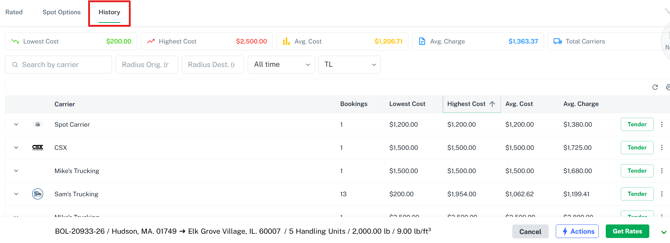
[G2M-3115] Rate Return - History Tab - Query all rates

We have introduced a brand new "History" tab within the Rate Drawer to help you easily reference past shipments and make more informed pricing decisions. This new view surfaces historical rate information based on your defined origin and destination radius, allowing you to quickly recognize how similar orders were shipped previously.

 G2M-4655: Highway Integration Enhancements 

This update brings 3 major upgrades to the Highway integration: automated capacity protection, a vetted freight marketplace, and hands-free tracking and safety updates.

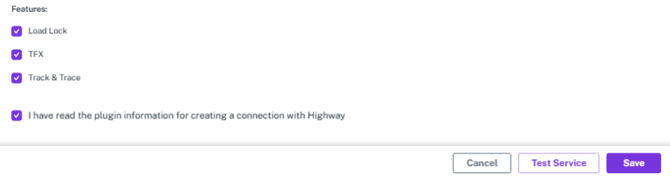
 Load Lock-Flags carrier fraud risk (overbooked capacity, out-of-range vehicles) and secures rate confirmation delivery with verified emails — before a load ever moves.

 TFX (Trusted Freight Exchange)-A vetted marketplace that matches verified carriers with credit-approved brokers, cutting out double-brokering and fake freight postings.

Load Lock+ (Track & Trace)-Uses ELD data to deliver fully automated, real-time pickup/delivery confirmation and shipment visibility.


Key Highlights:

These new features are selected upon connecting the plug in:

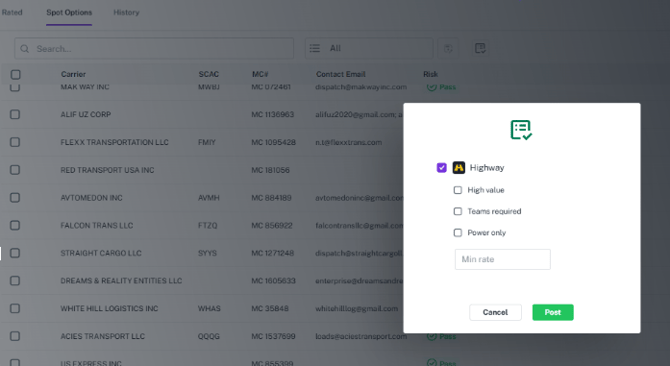
Within the Spot tab of the Rate draw>When Highway is connected, there is a new Post to Load Board icon:

Load Lock:

  • Automatically sends Secure Rate Confirmations to Highway for TL shipments awarded to verified Highway carriers

  • Maps incoming automated safety alerts from Highway directly to internal shipment notes with a specialized tracking tag for compliance documentation
  • Live manual overrides for vehicle numbers — any post-award asset changes sync back to Highway instantly
  • Disables carrier tendering and auto-updates the internal rate status to cancel whenever a Highway carrier withdraws an offer
 TFX (Trusted Freight Exchange) 
  • Added the ability to post, unpost loads to Highway directly in the UI
  • After posting, offers will be received from Highway and show as Rates in the Rate Drawer
  • User can accept offers coming from TFX Carriers in the Highway application
  • Automatically cancels all open carrier offers once a shipment is booked or awarded, preventing double-bookings

 Track & Trace 

  • Automated live location tracking and secure documentation, available directly in the platform
  • Real-time location updates, load statuses, and vehicle assignments processed automatically via webhook listening


[G2M-3853] MCP - Sync carrierChanges every 15 min

We have automated the synchronization of carrier data with MCP to keep your carrier accounts up to date while ensuring data cleanlines. The system now pulls recent updates frequently and runs a full sweep weekly, giving you more accurate information without manual upkeep.

  • Integrated automated API polling to fetch carrier changes every 15 minutes and update corresponding records only when changes are detected.

  • Enabled a weekly full data refresh on Sundays for all carrier accounts with a DOT number to verify overall data consistency.

  • Prevented the duplication of locations and contacts during updates, and added a functioning "Unsync" button to completely exclude specific carriers from future automated MCP updates.

[G2M-2248] MCP - Create All Accounts

We have introduced a powerful, one-click synchronization enhancement for the MyCarrierPortal (MCP) integration to dramatically simplify carrier onboarding. Users can now load their entire list of monitored carriers into the system at once, replacing the tedious task of manual account creation.

[G2M-4462] Color Theme - Update Hardcoded Colors

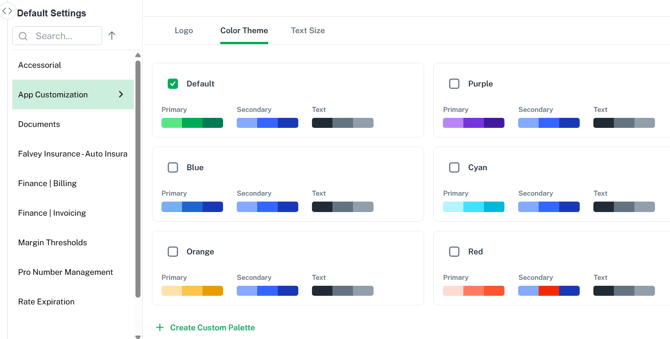
We have enhanced the application customization options to allow users to personalize their platform's visual styling with custom color themes.

  • Configured application customizations to remain distinct and secure across different user types, ensuring that Guests and Tenants can maintain completely independent color settings.

  • To access0, go to your profile in the top right of the screen and select 'Default Settings' then choose App Customizations to check it out! 

[G2M-4407] Client Account - Edit Spot Carrier Settings

We have enhanced spot quote routing to allow client accounts to maintain independent billing rules for their spot carrier relationships. This update ensures that when a client-owned spot rate is awarded, the Bill To information on the Bill of Lading (BOL) automatically maps to the correct responsible party rather than defaulting to the broker.

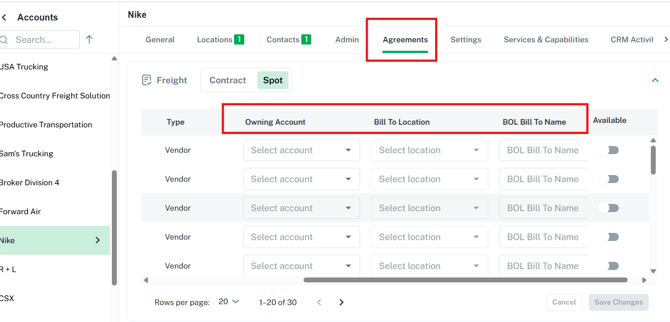
  • Added a new "Spot Default Settings" section to the Client Accounts Settings tab, allowing configuration of a default spot owning account, Bill To location, and custom BOL Bill To name.

  • Introduced edit functionality on the Client Freight Agreements Spot grid to let users customize specific Bill To information directly on individual spot rates.

  • Configured the system to dynamically update the Bill To records on the final BOL whenever a customized spot rate is awarded.


[G2M-4561] Builder - Multi Day Pickup/Delivery windows

We have introduced flexible date fields to the Shipment and Quote Builder screens to seamlessly support pickup and delivery windows that span multiple days. This update expands your scheduling precision by replacing static single-day entries with adjustable start and end timeframes.

  • Added two new input fields for Pickup Close and Delivery Close while adapting existing fields to capture Pickup Open and Delivery Open data.

  • Configured origin and destination appointment ranges to automatically align with their corresponding open and close windows when selecting appointment types.

  • Integrated the new multi-day date ranges across all Manage grids, the Bill of Lading (BOL) and Rate Confirmation documents, as well as the spot and tender email bodies.


Carrier Related Enhancements and Improvements:

[G2M-4689] Saia/Estes - Fix Document Retrieval - Capture All Pages

  • We have resolved an issue with document retrieval from Saia and Estes to ensure you receive complete paperwork for your records. The system now fully captures and saves multi-page documents rather than just the first page.

  • Updated the retrieval logic to automatically save and merge all pages when downloading a proof of delivery (POD) or bill of lading (BOL) from Saia and Estes.

  • Verified functionality within the automated document retrieval process to ensure continuous, hands-free capturing of complete multi-page records moving forward.


G2M-4744] UPS Tracking-Mapping updates

We have corrected a tracking status mapping issue with UPS to ensure your shipment milestones accurately reflect real-world events

  • Adjusted the tracking event logic so that the status "Shipper created a label, UPS has not received the package yet" no longer places a shipment into "In Transit" status.

  • Fixed the mapping error to prevent this initial label creation event from being logged on the tracking page as "Picked Up".

  •  Ensured that the Bill of Lading (BOL) overview status correctly remains in "Booked/Awarded" status when this specific UPS event is received, keeping it there until the package is physically picked up or in transit


We've made the following improvements in this release:

[G2M-4526] Edit Costs/Charges - Optimize Loading Audit when matching or viewing audit

We have optimized the performance of the bill and invoice audit screens to significantly improve loading speeds and eliminate unnecessary waiting times.

  • Accelerated page load times within the Expected Cost grid when viewing an audit or after matching a cost.

  • Improved the data loading speed within the Bills grid for both the matched audit view and the post-matching process.

  • Enhanced responsiveness for the Expected Charge section to optimize loading times for the invoice audit view.


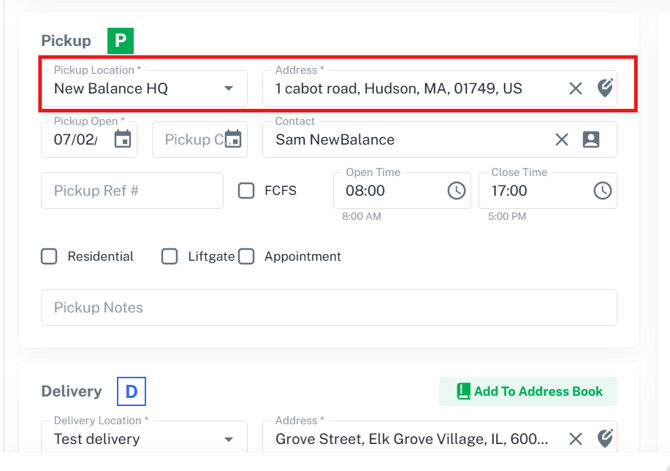
[G2M-4571] Address Clearing Behavior When Editing Location
Previously, modifying a pickup or delivery location name that was selected from a stored source would unexpectedly wipe out the entire associated address, forcing users to re-enter the information manually. This helps streamline the user experience, especially when correcting an address line or entering a different address than what was selected. 


[G2M-4664] Tender Button Performance Improvement

 We've upgraded the Tender button in the Rate Drawer for a faster, smoother booking experience. 

Provide Your Feedback:

Your input is invaluable as we continue to evolve. If you have any questions, suggestions, or encounter any issues, please don't hesitate to reach out to our support team at support@G2Mint.com

Thank you for being a valued customer!

Sincerely,

The G2Mint Team