|
G2Mint Gmail Extension - Build Quotes, Book Shipments and Upload Documents Directly from Your Inbox! The G2Mint Gmail extension bridges your inbox and G2Mint. Miles — G2Mint's AI agent — reads the incoming quote request email, drafts the record for you, so a rate request becomes a quote and any document emailed (BOL, POD, W&I , Invoice etc..) can be uploaded and attached to an existing shipment in just a few clicks!
Feature Highlights: All these items can be accomplished without leaving your inbox!
Installing the extension takes a few setup steps, click this link to get started and feel free to reach out to our support team at support@G2Mint.com with any questions or requests for assistance. *A note on AI-generated records: Miles drafts the record, but you always have the final word. Nothing is saved to G2Mint until you review and approve it, so give the details a quick look before you do. The draft is a head start, not a substitute for your review. |
|
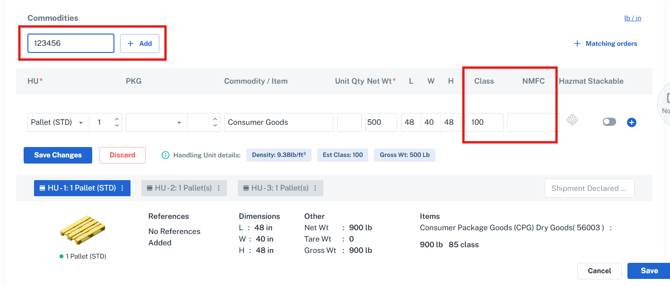
Builder Enhancements — Order, Shipment & Load (G2M-5049) The commodity section of the builder has been reorganized to speed up entering key shipping details, along with several additions across the quote, shipment, order, and load builders — including booking directly from the new Chrome extension covered above.
|
|
BOL Document Enhancements (G2M-5225, G2M-4334)
|
|
Freight Bill Audit Enhancement (G2M-1871) Auditing a carrier bill with no matching shipment previously meant building the shipment and entering the carrier and costs manually. A new Create Shipment action on the bill now handles it in a single click.
Stay tuned for further enhancements, including enabling the shipment to pull tracking details and retrieve key shipping documents directly from the carrier.
|
|
QuickBooks Integration — Custom Field Mapping (G2M-5008, G2M-5093) The QuickBooks plugin now lets you map your own QuickBooks custom fields to G2Mint shipment data, so bills and invoices carry the reference information your business runs on.
|
|
Convenience APIs — Enhancements (G2M-4881, G2M-4813)
|
|
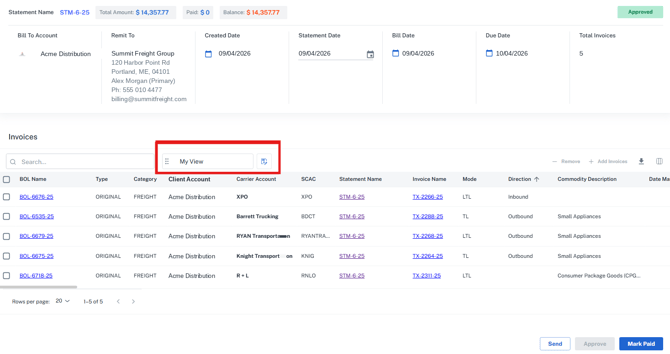
Statement Detail — Columns & Saved Views (G2M-4969) The Statement Overview Detail grid now carries BOL Number alongside BOL Name, plus Mode, Carrier SCAC, Direction, PO reference, and commodity description — the same columns available on the Invoices grid. Views can be customized and saved as a default, and the CSV download returns every invoice on the statement regardless of how many pages the grid is showing.
|
|
Fuel Surcharge — Multi-Week Average Index (G2M-5031) Fuel surcharge agreements can now calculate against a multi-week average index rather than the current week alone — up to a 12-week lookback. An optional Week of the Month setting holds that average steady for the full month, refreshing on the week you choose, and supports both the EIA US index and the FCA Canadian index across its LTL, TL, and Heavy TL weight bands in CAD or USD. |


We've made the following improvements in this release: |
|---|
|
Automated Tracking & Document Retrieval — Increased Frequency (G2M-4674) Automated tracking and document retrieval now run every 2 hours between 7:00 AM and 7:00 PM ET, and every 4 hours overnight — up from every 4 hours around the clock. Status updates and documents land on the shipment sooner, with no configuration required. G2M-4687 Financial Grids - Requested and Actual Pickup and Delivery Dates Introduced the shipment's requested and actual pickup and delivery dates onto your financial grids, giving you insight into how a shipment actually moved while you're reviewing its costs, charges, and invoices.
Multi-Stop & Multi-Trip Building (G2M-4974, G2M-5071) Load Builder — Existing loads can be opened, edited, and re-rated, with mileage calculated across each trip. Booking a multi-trip load creates one leg per trip, removing a load returns its shipments to New status, and billable rating draws from the load's own agreement. Multi-Trip Rate Drawer — Improved performance of the Cost Detail when switching to Billable Detail, so the Default Markup Agreement displays immediately. Only accessorials set to Auto Apply are applied, and expanded carrier detail now scrolls horizontally to show all financial columns. Grid View Date Filters (G2M-5148) Relative date options — Is Before Today, Is On or Before Today, Is After Today, and Is On or After Today — now work when building a View on any grid that uses date fields, including Track and Manage Shipments. This applies to requested, estimated, and actual pickup and delivery dates, so saved Views stay accurate as the date rolls forward without needing to be updated. |
|
|
Provide Your Feedback:
Your input is invaluable as we continue to evolve. If you have any questions, suggestions, or encounter any issues, please don't hesitate to reach out to our support team at support@G2Mint.com
Thank you for being a valued customer!
Sincerely,
The G2Mint Team