Version: 26.17
What's Different in This Release?
If you track shipments: "Delayed" is no longer a status of its own. A shipment can be flagged as delayed while keeping whatever status it's actually in, and a new Delayed column on the grids sorts and filters. Delayed Now Travels Alongside Shipment Status
If you email invoices, statements, or payables: The "Transmit" button is now labeled "Send," and a separate Email button sends a copy without advancing the transaction's status. Email a Transaction Without Changing Its Status
If you rate freight within Canada: GST, HST, PST, and QST now calculate automatically based on the destination province. Canadian Tax Support
What's New in This Release?
Click any item below to jump straight to its details.
- Tracking — Delayed Now Travels Alongside Shipment Status
- Internal Resources — Manage Who's Working a Move
- Tracking Link — Copy and Share from Any Grid
- Builder — Open a BOL Directly from the Builder
- Temperature Requirements — Available on Any Equipment Type
- Financial Grids — Email a Transaction Without Changing Its Status
- Invoices & Statements — Finance Contacts Fill In Automatically
- Freight Agreements — CWT Rates with Distance Breaks
- Canadian Tax Support — GST, HST, PST & QST
- QuickBooks Integration — Payment Updates Without the Extra Step
- Carrier Web Services — Enhancements for STG Logistics, FedEx Parcel, and ODFL
- Platform Improvements — Documents, Grids, Rating, and the Home Tab
Tracking — Delayed Now Travels Alongside Shipment Status (G2M-3642)
A shipment can now be flagged as delayed without losing sight of where it actually is, so your team keeps full visibility into a load's real progress while still knowing it needs attention.
- Delay is independent of status. Switch on the Delayed toggle from the tracking page, choose a reason and the date and time, and the flag rides alongside whatever status the shipment is in.
- Visible across your grids. A new Delayed column on the BOL grids sorts and filters, putting at-risk freight one click away.
- Clears itself on delivery. Once the shipment delivers, the flag comes off — no cleanup needed to keep your grids accurate.
- How to apply? While in the Tracking tab, there is a new toggle within the map area allowing you to flag the shipment as delayed. There are optional reason codes to apply as well as specific date/times.
Tip: Have your team flag delays as they happen, then save a view filtered to Delayed — every at-risk shipment collects in one list you can work from each morning
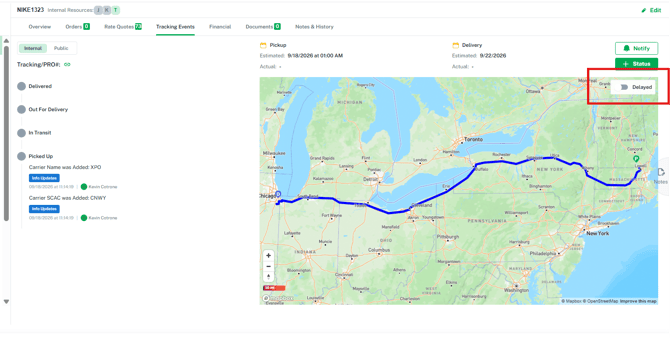
Delayed will appear within the Overview next to the status as an indicator
Internal Resources — Manage Who's Working a Move (G2M-5322)
The people assigned to a quote, shipment, or load can now change as the move evolves, so the record always reflects who is actually handling the freight.
- Add and remove resources on the BOL. Choose from the contacts on your account and set their role for that specific move.
- Visible on the grid. Everyone assigned appears together, so ownership is clear without opening the record.
- Account changes stay put. Updating the internal resources on an account no longer reaches back and rewrites BOLs that were already created.
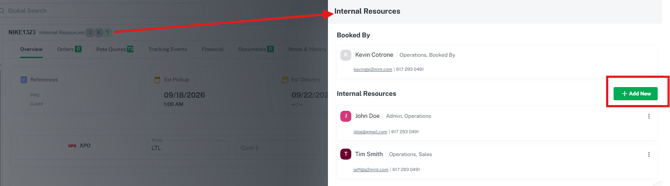
- How to apply? While in a BOL, click on the internal resources next to the BOL ID, a window will appear indicating the booked by person and any pre-assigned Internal resources. Click the 'Add New' button and choose from a list of available contacts on the account.
- Note: To have assigned contacts automatically on a BOL, this can be done by going to the Engage section, selecting the account, then click on the 'Admin' tab to assign the contacts.
Tracking Link — Copy and Share from Any Grid (G2M-5293)
The tracking link you share with customers is now a click away, so you can give a consignee shipment status without composing a notify email.
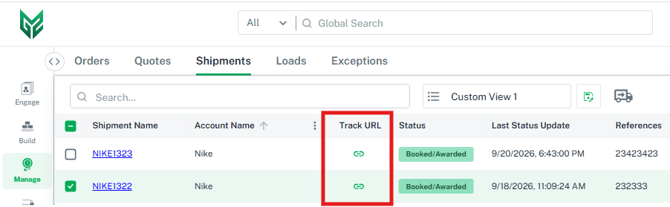
- New "Track URL" column on every BOL grid gives you the link straight from the list.
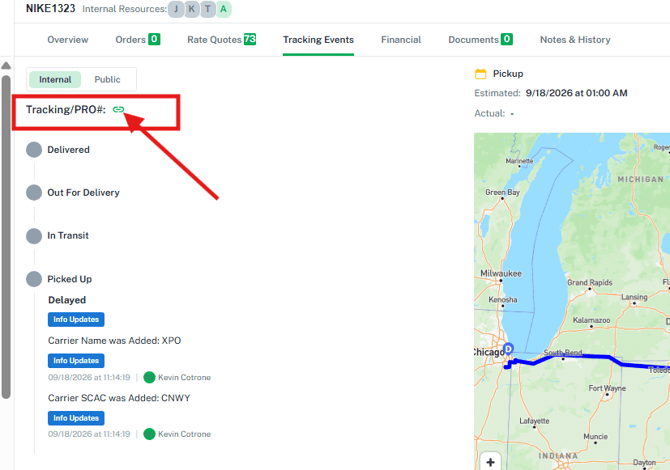
- Copy icon on the Tracking tab, next to the PRO number, does the same from inside the record. Click on a BOL, go to the Tracking Events tab and you will see the tracking link next to the Pro #.
- Simply click the link in the column or in the Tracking event tab, then paste it into an email to your customer if you prefer not to send them the G2Mint tracking email with the link.
- No login required. Anyone you send the link to can follow the shipment.
Builder — Open a BOL Directly from the Builder (G2M-5208)
The BOL name on the Builder screen and in the Rate Drawer is now a link to the record, so you can reach Financials, Tracking Events, and the rest of the detail without backing out to a grid first.
- Save or rate a quote, shipment, or load, then click the BOL name to open its Overview.
- The record opens in a new tab, so the work in your Builder stays exactly where it is.
- Located at the bottom left of the screen, you will now see a direct link to the overview tab of the saved record.

Temperature Requirements — Available on Any Equipment Type (G2M-5341)
Minimum and maximum temperature now travel with the freight whatever equipment is selected, so a temperature-sensitive commodity stays visible to everyone handling the move.
- Enter and view temperatures on the Builder settings drawer, the BOL Overview asset section, the equipment panel, and the Load header.
- The values print on the BOL document, so the driver and the dock see them too.
Financial Grids — Email a Transaction Without Changing Its Status (G2M-4709)
You can now send a payable, remittance, invoice, or statement to someone without advancing the transaction, making it easy to share a copy for review or answer a question mid-cycle.
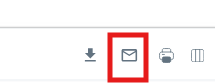
- New Email ICON on the top right of the grids and the detail screens opens the same window you already use, with required documents attached.
- Status stays put. The transaction remains exactly where it was in your workflow.
- "Transmit" is now "Send" across the financial grids, keeping the two actions clearly apart.
Invoices & Statements — Finance Contacts Fill In Automatically (G2M-5364)
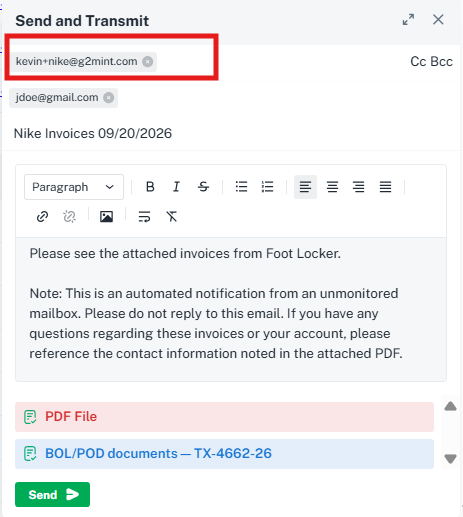
Emailing an invoice or statement now addresses itself to the contacts set on your client shipper accounts so billing reaches your customer's finance team without anyone looking up a contact.
- Every contact on the client account with a Finance type is populated on the To line.
- If there is no finance contact, the account's default contact is used instead.
- Applies to the Email button, the Send button, and automated invoice and statement delivery.
Freight Agreements — CWT Rates with Distance Breaks (G2M-5203)
CWT agreements can now price on mileage as well as weight, so contracts that vary rate by distance can be loaded and rated exactly as they're written.
- New Distance Breaks option on a CWT charge type lets you enter a rate for each mileage and weight combination.
- Rates off actual mileage of the quote, shipment, or load.
- Finer fuel precision. Fuel ranges now accept up to eight decimal places.
Canadian Tax Support — GST, HST, PST & QST (G2M-5173)
Freight moving within Canada now rates with the correct sales tax applied, so your quotes and invoices line up with what the Canada Revenue Agency expects.
- Destination province drives the tax, following place-of-supply rules.
- Applied across the full cost. Tax calculates on linehaul, fuel surcharge, and accessorials.
- Set up as accessorials, so they flow through rating, billing, and invoicing like any other charge.
QuickBooks Integration — Payment Updates Without the Extra Step (G2M-5260)
Marking a bill or invoice paid in QuickBooks now updates G2Mint on its own, so your payment status stays current without going back into the record to re-save it.
- Payments sync as they post, for both bills and invoices.
- Resync button on the connection screen re-matches vendors and customers if they drift out of step.
- Richer memo data. Transactions carry BOL number, references, and PRO number, making them searchable in QuickBooks.
- Clearer errors. When QuickBooks declines a transaction, the reason it returns is shown to you rather than a generic message.
This release includes enhancements and improvements across our direct carrier API connections — tendering, labels, and tracking.
STG Logistics (G2M-5283) — Tenders now confirm correctly when the carrier has already received the shipment, so a slow carrier response no longer leaves a shipment showing as untendered after the request went through.
FedEx Parcel (G2M-5314) — Labels for FedEx Home Delivery now include the residential accessorial automatically, so parcel shipments to residential addresses generate a label on the first attempt.
ODFL (G2M-5446) — Automatic and manual tracking requests now process correctly following a change on the carrier's side, keeping shipment milestones flowing into the platform.
BOL Document — Cleaner References & Clearer Delivery Requirements (G2M-5270)
The BOL document now makes better use of the space it has and states your delivery requirement in plain language, so fewer shipments need a supplemental page.
- Each reference or PO number appears once in the References section, however many commodities carry it.
- Long reference lists wrap inside the Customer Order Information section, and unused rows collapse.
- Delivery dates become a clear instruction — Must Arrive By, On, Before, or Within — shown in the delivery special instructions.
- The bill-to contact email now appears in the Bill To section.
Builder Map — Mileage Displayed (G2M-5276)
The Builder map now shows the miles for the move as you enter it, so you can size up a lane before you rate it.
- Miles update as you refine the stops, from a postal code through to a full street address.
- Works for multi-stop quotes, and the map scale now reads in miles.
Shipments — Assigned Status Reflects the Awarded Carrier (G2M-5288, G2M-5401)
A shipment whose carrier has been assigned now shows as "Assigned" everywhere, so your grids tell you at a glance what is ready to book.
- Applies when a workflow automatically assigns the lowest cost carrier, and when a carrier is assigned during a shipment upload.
- The status updates immediately, with no refresh or manual edit needed.
- Example Use Case: Upload your shipments with a designated carrier, have your workflow configured to book the assigned carrier to the lowest cost rate.
Bills — Notes Save and Surface on the Grid (G2M-5306)
Notes on a bill now save reliably and are visible from the grid, so the reason a bill is in dispute travels with it.
- Add a note while editing a bill and it persists on the record.
- A new Bill Note column on the Bills grid shows which bills carry a note, and it filters — making disputed bills with context easy to pull up.
BOL Overview — Commodity Section on Smaller Screens (G2M-5295)
The commodity section on a BOL Overview now fits comfortably on a laptop screen, keeping every value aligned and readable.
- The layout adjusts to the width available across Quotes, Shipments, Loads, Tracking, and Ready to Tender.
- Freight class now reads with its label, as "Class 150."
Home Tab — Tiles Refresh on Their Own (G2M-5302)
Every tile on your Home tab now loads its own current numbers, so the views you built for each member of your team can be trusted at a glance. Individual and general tile views refresh independently, with no need to click another tile first.
Invoices & Statements — Predictable Email Attachments (G2M-5387)
Outbound invoice and statement emails now always carry the invoice or statement itself as an attachment, so your customer never has to follow a link to the document they need in order to pay.
- Supporting documents such as PODs and BOLs are attached as well when they fit within the size limit.
- If the supporting documents would exceed the limit, they are sent as links and the invoice remains attached.
Address Book — Shared Locations Visible to Guest Users (G2M-5360)
Shipper guest users now see shared address book locations alongside their own, so they can build from the locations your team maintains. Locations with no account assigned are available to guests, in addition to those assigned to their account.
Provide Your Feedback
Your input is invaluable as we continue to evolve. If you have any questions, suggestions, or encounter any issues, please don't hesitate to reach out to our support team at support@G2Mint.com.
Thank you for being a valued customer!
Sincerely,
The G2Mint Team