Skip to content
English
  • There are no suggestions because the search field is empty.

G2Mint Release Notes: October 10.23.2025

Version: 25.21 

What's New in This Release?

We're excited to announce the latest updates to G2Mint designed to enhance your experience and provide you with even more value. This release includes a range of new features, improvements, and bug fixes that address your feedback and our ongoing commitment to innovation.
Ticket ID
Release Note 
G2M-3746 Denim Factoring Plugin
New plugin! Streamline Your Cash Flow with Denim Factoring Integration

We are excited to announce a powerful new integration with Denim, a leading factoring company. This update is designed to significantly accelerate your cash flow and simplify your accounting by allowing you to submit approved expenses and revenues directly to Denim for factoring with a single click. This eliminates manual data entry and streamlines the process of getting paid, making your factoring workflow more efficient.

This feature is enabled on a per-client basis. A new setting, "Denim Factoring," is now available on the client account page.

How It Works?

Enable the Feature: First, the "Denim Factoring" setting must be enabled for any client account you wish to use this feature for.

Select Records: Navigate to the Payable or Invoice grid.

Factor with Denim: Select one or more records. A new quick action button, "Factor with Denim," will be available.

Note: This button will only be enabled if all selected records belong to a client with the "Denim Factoring" setting turned on.

Submit: Once you click the button, the system validates the records (see requirements below) and sends them directly to Denim.

Track Progress: After successful submission, the status of the Payable and Invoice records will automatically change to "Processing," and the official Denim ID will be stored on the financial record in the grid for easy tracking.

To be sent to Denim, all selected records must meet the following criteria:

The record must be of the type "Freight".

The Expense (Payable) must be "Approved".

The Revenue (Invoice) must be "Approved".

A Bill of Lading (BOL) document must be uploaded to the associated BOL.

A Proof of Delivery (POD) document must be uploaded to the associated BOL.

The Rate Confirmation will be sent automatically as it is already stored in our system.

If any selected record fails these checks, an error message will appear identifying the specific record(s) that are not valid for submission.

Additional Information:

To support this new integration, we've also added the following enhancements:

New Grid Columns: We have added new "BOL Uploaded" and "POD Uploaded" columns to the Shipment, Load, and Dispatch grids. These columns provide a quick visual checkmark  to confirm if the required documents are attached.

Multi-Stop Logic: For Loads with multiple stops, the "BOL Uploaded" and "POD Uploaded" checkmarks will only appear on the main Load record after all underlying shipments have the required documents uploaded.
G2M-3602: User Management-Shipper Guest Access to Child Accounts
Shipper Client Guest Portal: Enhanced Visibility for Guest Shippers in Parent/Child Accounts
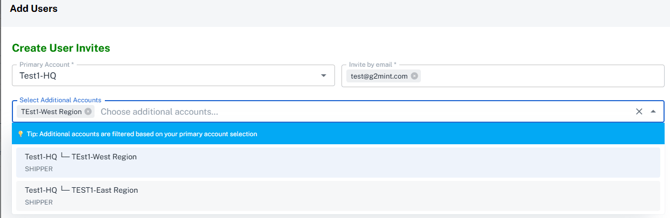
Before: When a guest shipper was given access to a parent account, they could only see shipment activity for that specific parent account. Activity from child accounts was not visible.

Now: A guest shipper with access to a parent account will automatically see all shipment activity from all associated child accounts. This provides a comprehensive overview without needing to grant access to each child account individually.


G2M-3373: User Management Enhancements

 👥 Enhanced User Management: Multi-Account Access

We've upgraded our User Management system to provide greater flexibility for user-to-account assignments and to streamline the roles available in the UI.

Users are no longer restricted to a single account! We've added new fields to the User Detail view, allowing a user to be associated with multiple accounts.
G2M-3906:BOL Name and PRO - Add to all Payables Grids
Financial (Settle) Grid Enhancements

We've updated our financial grids to make searching and verifying transaction data much faster!

BOL Name and PRO Number Added: The Bill of Lading (BOL) Name and PRO Number columns are now visible on the Expected Cost, Bills and Payables grids.

Improved Workflow with Hyperlinks: For easy navigation, the BOL Name is a clickable hyperlink on the Expected Cost, Payables, Expected Charge, and Invoices pages, leading directly to the associated shipment or load record.
G2M-3885: Shipment Upload leveraging Address book entries
For shipments uploaded via the ‘Shipment Upload’ feature, if a pickup or delivery location name is included in the file and the full address profile and contacts exist in the Address Book, the information will automatically populate on the shipment. This streamlines the upload process, allowing users to avoid entering all details as long as the locations are saved in the Address Book or the Engage > Account > Locations area.
 

G2M-3797 Builder - Remove PO, SO, TO Prefixes

✨ UI Enhancement: Order Number Display

We've updated the display format for Purchase, Transfer, and Sales Order numbers on the Quote and Shipment Builder (Commodities Section) pages to reduce visual clutter and improve readability.

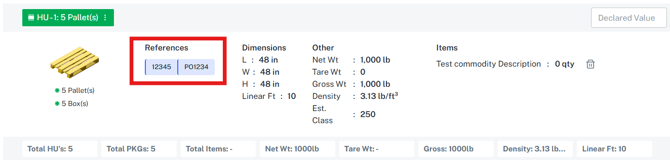
Prefixes Removed: The prefixes PO- (Purchase Order), TO- (Transfer Order), and SO- (Sales Order) have been removed from the displayed number in the respective fields.

Example: An order previously displayed as PO-2182 will now simply read 2182. If you want to have the prefix then upon entering the number you can simply type in the appropriate prefix ‘PO-2182’. This provides our users with greater flexibility in how they want their references to be displayed. 

This change only affects the display; the full order number remains saved in the system.

G2M-3788: Awarded - Update Estimated Delivery Date

Automatic Estimated Delivery Date Update

We've automated the process for updating your Estimated Delivery Date (EDD) to ensure your shipment and load records are always accurate and current immediately upon rate award.

What's New

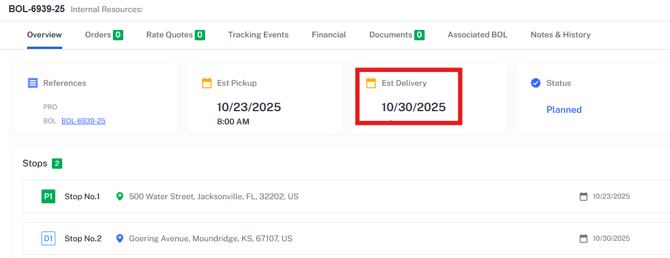
When you Award a Rate that includes an Estimated Delivery Date (EDD), the system will now automatically update the primary EDD field on the Shipment and Load records. 


Why This Matters?

This automation eliminates manual data entry and ensures immediate visibility of the confirmed delivery date. This updated EDD will now be accurately displayed on both the Overview screen and the Tracking Events screen for the BOL.

This ensures better tracking communication and improved planning the moment you finalize your carrier selection.

Audit View for Balance Due Bill

 💸 Feature Update: Enhanced Bill Audit for Balance Due Bills

We have upgraded the Carrier Bill Audit process to fully support Balance Due (BD) bills received from carriers, ensuring all partial and final payments are accurately tracked and processed.

What’s New: Specialized Bill Audit UI

The Bill Audit screen now includes a specialized view that activates only when processing a carrier's Balance Due bill (EDI 210 type "BD"). This new UI provides the necessary context for approval:

Full Visibility: Brokers and Shippers can now clearly see the original approved amount and the new balance amount sent by the carrier for the Balance Due bill.

Accurate Approval: This targeted display enables brokers or shippers to verify and approve the correct outstanding balance.

Updated Payable Logic for Balance Dues

To correctly manage the financial ledger, we've introduced new logic for processing approved Balance Due bills: In the below example, the balance due can be identified via the ('-BD') appended to the Pro number on the cost record. 

This ensures every financial transaction is accurately recorded against the original shipment or load. 
Status of Original Payable
System Action
New Payable PRO Number
Not Processed (e.g., payment not yet sent)
The system will update the original Payable record with the newly approved balance.
Original PRO Number
Already Processed (e.g., payment has been sent)
The system will create a new Payable record for the Balance Due amount.
Original PRO Number -BD


G2M-3605: Rate Confirmation and Quote Confirmation docs-Based on updated Financial Records

Enhanced Rate and Quote Document Accuracy

We've updated the way your Rate and Quote documents are generated to ensure carriers and clients always receive the most current pricing.

What's New:

Previously, these documents were based directly on the initial Bill of Lading (BOL) record. Now, once a BOL reaches a specific status (e.g., Awarded), the system will generate Rate and Quote documents directly from the associated financial records.

Why This Matters:

This change ensures that any post-award adjustments—which users typically apply directly to the Expected Cost, Payables, or Invoices records—are automatically reflected in the final Rate and Quote documents. Your printed documents will always reflect the single source of truth: the most up-to-date financial data.

G2M-3522: MCP - Sync webhooks

This ticket further enhances our existing MCP plugin to keep MCP data current. We will also automatically add new carriers who have completed packets. This ensures that MCP and G2 synchronize with carrier data.  

G2M-3073:Bulk Tender from Grids

New Feature: Quick Bulk Tender Action
We've added a powerful new action to the Shipment, Load, and Dispatch Grids to streamline your workflow and save you time!
The new Tender action allows you to bypass the full rate drawer and immediately tender multiple loads or shipments that are in the "Assigned" status.
Key Benefits:
  • Fast Batch Tender: Quickly select multiple assigned shipments or loads right from the grid and tender them all at once.
  • Workflow Integration: Supports advanced workflows where you can first assign carriers based on internal logic (like lowest cost or fastest transit time) and then execute the tender with a single click.
  • Efficiency: Because the rate and carrier are already locked in with the "Assigned" status, this action moves loads to the next stage much faster.


Carrier Connections: Enhancements and Improvements

Ticket ID
Release Note 
Fed Ex Parcel
This enables rating and labels for Fed Ex Parcel within G2Mint.
Moran Transportation
This enables rating, scheduling, tracking via API for Moran Transportation.
Standard Forwarding 
This enables rating, scheduling, tracking, and documents via API for Standard Forwarding Transportation. 
EDI Express
This enables rating, scheduling, tracking, and documents via API for EDI Express.
Tax-Air
This enables rating, scheduling, tracking, and documents via API for Tax-Air
Document Adjustments
Documents retrieved via API from XPO, ABF, and Estes in TIFF format will now be automatically converted to PDF, ensuring easier access and consistency across your document workflows.
Bug Fixes

Your feedback helps us make G2Mint more stable and reliable. We've addressed the following issues in this release:

Ticket ID
Release Note 
 G2M-3882: Update Expected Charge on a Load
This allows you to update the expected charge on a load. You can choose to update the charge record directly on the master BOL financials tab or within the charge record in the Settle > Invoices > Charges section.
G2M-3877: Account Name Missing on Shipment Grid for Broker-Shipper Client
This resolves a display issue for shipments created by Shipper Client Guests. The Account name field now consistently appears in the shipment grid, making it visible to both the broker and the client. 

Note: Fix might not be available due to last minute testing


Provide Your Feedback:

Your input is invaluable as we continue to evolve. If you have any questions, suggestions, or encounter any issues, please don't hesitate to reach out to our support team at support@G2Mint.com

Thank you for being a valued customer!

Sincerely,

The G2Mint Team