Version: 26.20
What's New in This Release?
- Shipment Grids — See the Assigned Carrier at a Glance
- Multistop Quotes — Reorder Any Stop, Including Pickup and Delivery
- Client Documents — Rate and Quote Confirmation Templates per Client
- Bill Audit — Review Shipments Created from Bills Before They're Approved
- Fuel Index — Canadian FCA Fuel Index
- Bills — EDI 210 Pickup Date, Delivered Date and Fuel Surcharge Rate
- Areas — Build Areas from Your Address Book
- Builder Settings — You Decide When the Delivery Window Goes in Delivery Notes
- Builder — Stackable and Temperature Ranges Fill In from Your Commodities
- Documents — More Document Types for Uploads
- Analytics — Share Dashboards with Your Shipper Guests
- QuickBooks — Vendors and Customers Created with Mailing Addresses
- International Detail — Cross-Border Shipment Details Built Into the Builder
- Highway — Choose Your Broker Load Owner Email
- Carrier Related Enhancements and Improvements
- Additional Improvements
Shipment Grids — See the Assigned Carrier at a Glance (G2M-5625)
Your Shipments and Loads grids now show which carrier a shipment is assigned or tendered to, so you can manage bulk tendering without opening each record.
- "Carrier Name" fills in early: The carrier appears as soon as a rate is assigned or tendered, and updates if you switch carriers or award to someone else.
- Search by carrier: Search the Shipments and Loads grids by carrier name to pull up everything assigned or tendered to that carrier.
Multistop Quotes — Reorder Any Stop, Including Pickup and Delivery (G2M-5537)
Build multistop quotes in whatever order the route needs, without starting over.
- Drag any stop: The Pickup and Delivery Location stops can be dragged anywhere in the sequence, just like the stops in between.
- First and last stay smart: Whichever stop lands first or last becomes the new pickup or delivery location, and pricing updates to match.
Client Documents — Rate and Quote Confirmation Templates per Client (G2M-4976)
Give each client the look and terms they expect by assigning their own Rate Confirmation and Quote Confirmation templates.
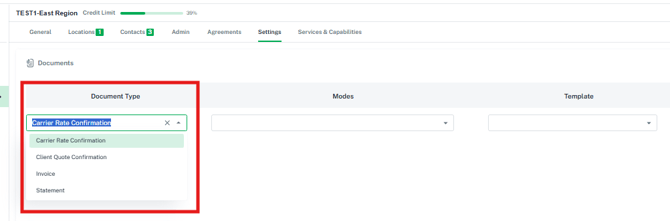
- More document types: Client account document settings now include Rate Confirmation and Quote Confirmation, alongside Invoice and Statement.
- Works everywhere: The client's template is used whether the document is created by hand, from a spot quote or by a workflow.
- Safe fallback: If a client has no template assigned, or the template isn't set up for that mode, your default template is used.
- To access, open the client account and go to Settings > Documents.
Bill Audit — Review Shipments Created from Bills Before They're Approved (G2M-5451)
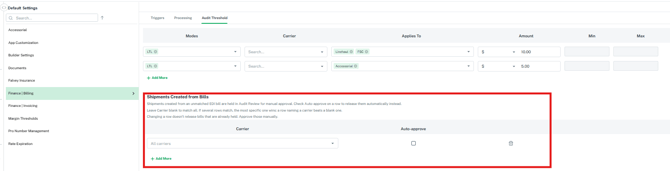
When you create a shipment from an unmatched EDI bill, the bill now waits in Audit Review so your team can check documents, weights and charges before anything is approved for payment.
- Clear reason: The bill's Audit Result explains why it's being held.
- Prefer it automatic? Add a row with "Auto-approve" checked and the cost is approved right away. Leave Carrier blank to apply it to all carriers, or pick a carrier to set rules carrier by carrier.
- Note: Bills already held before you change a setting stay in Audit Review and can be approved manually.
- To access, click your profile in the top right, then select Default Settings > Billing > Audit Threshold > Shipments Created from Bills.
Fuel Index — Canadian FCA Fuel Index (G2M-5130)
Canadian fuel surcharge data now comes straight into G2Mint, so you always have the current FCA index alongside the U.S. EIA index.
- Always current: FCA index rates load when you connect and update automatically each week.
- CAD and USD: See both Canadian-dollar and U.S.-dollar rates, broken out by LTL, TL and Heavy TL weight brackets.
- Note: An FCA API account is required. Connect it in the Plugins section.
- To access, go to Configuration > Fuel Index Table and select the FCA tab.
Bills — EDI 210 Pickup Date, Delivered Date and Fuel Surcharge Rate (G2M-5206)
Review carrier bills faster with more of the EDI 210 details right on the bill.
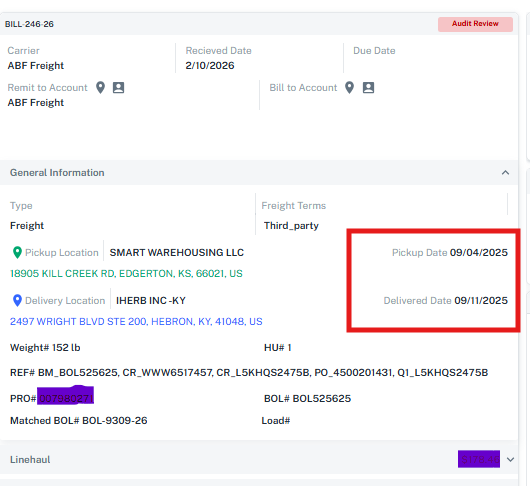
- Pickup and Delivered dates now show next to the pickup and delivery locations.
- Fuel surcharge rate shows alongside the fuel surcharge amount, so you can audit it at a glance.
- Edits to the bill keep these imported details intact.
Areas — Build Areas from Your Address Book (G2M-4532)
Build Areas from the locations you already use most. Address Book locations are now offered alongside Engage Account locations when you set up an Area.
- Search both at once: Search and select Address Book and Engage locations in the same step.
- Right country, right list: Locations are filtered to the countries you chose for the Area.
Builder Settings — You Decide When the Delivery Window Goes in Delivery Notes (G2M-5589)
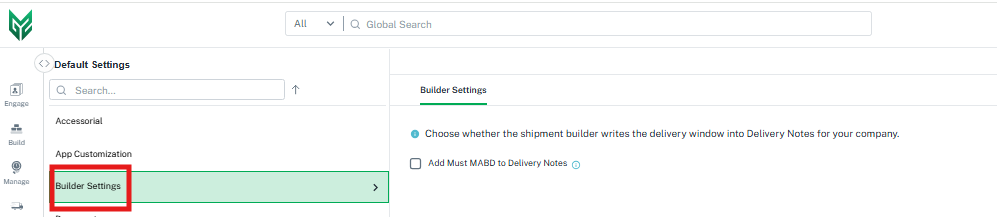
Choose whether your delivery dates automatically add a delivery window (such as "Must Arrive By") to Delivery Notes, so it prints on the BOL and rate confirmation only when you want it to.
- Your call: Some carriers treat a must-arrive-by date as guaranteed service. Turn this off when your delivery dates are for reference only.
- Note: This setting is off by default. Turn it on to have the delivery window added automatically.
- To access, click your profile in the top right, then select Default Settings > Builder Settings. Stay tuned for more settings in this section coming soon!
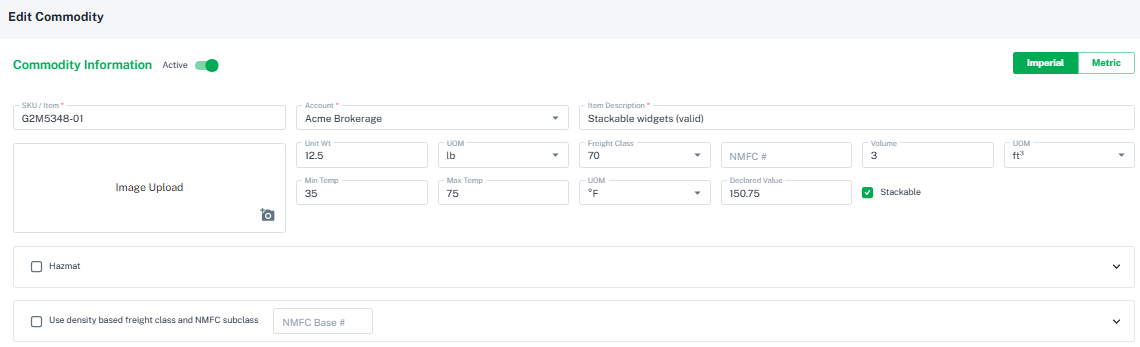
Builder — Stackable and Temperature Ranges Fill In from Your Commodities (G2M-5562)
Build shipments faster and more accurately. Handling units and shipments now pick up stackability and temperature ranges straight from your saved commodities.
- Stackable: A handling unit is marked stackable when all of its commodities are stackable.
- Min/Max Temp: The shipment's temperature range fills in from its commodities.
- You can still change either one by hand.
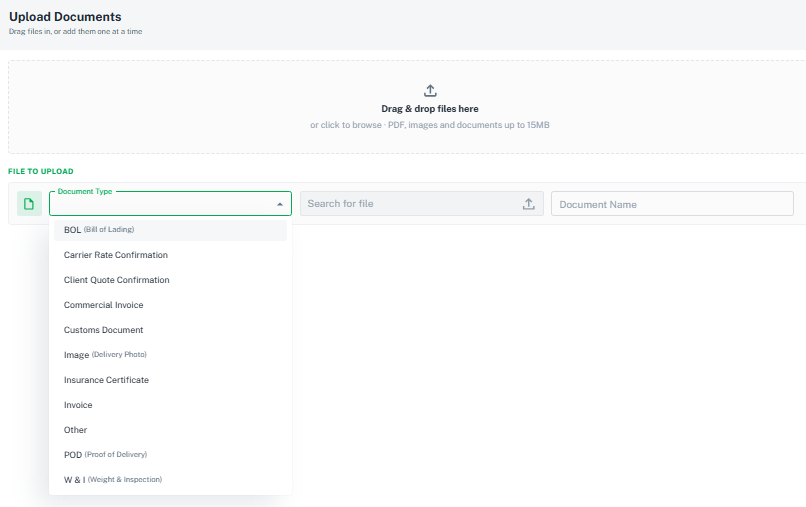
Documents — More Document Types for Uploads (G2M-5905)
Keep all of your paperwork organized on the shipment. Commercial Invoice, Customs Document, Insurance Certificate and Other are now available when you upload documents to a shipment or load.
Analytics — Share Dashboards with Your Shipper Guests (G2M-5174)
Brokers can now give their Shipper Guests access to analytics dashboards built for shippers, giving your customers visibility into their freight.
- Built for shippers: Shipper and Shipper Guest users see only the dashboards built for them.
- Note: Each user needs an analytics license to access dashboards.
QuickBooks — Vendors and Customers Created with Mailing Addresses (G2M-5547)
Payables and invoices sent to QuickBooks now create vendors and customers with their mailing address already filled in.
- Factoring-ready: If a carrier has a factoring company as its remit-to, that address becomes the vendor's mailing address.
- Jump to QuickBooks: Click the QuickBooks ID in the grid to open the bill or invoice directly in QuickBooks.
- Heads-up: If a carrier's remit-to address isn't set up, you'll see a warning that the vendor was created without a mailing address.

International Detail — Cross-Border Shipment Details Built Into the Builder (G2M-5181)
Cross-border shipments now carry their customs and trade details right on the shipment, so everything your broker and carrier need travels with the BOL.
- Shows up when you need it: The "International Detail" button appears in the Quote, Shipment and Load Builder whenever your stops are in different countries.
- Everything in one place: Capture Entry Number, HTS Code, Country of Origin, Duty Rate, Customs Value, Incoterms, Ports of Loading and Discharge, Final Destination, Vessel Info, Air Waybill, Container Marks, FTZ admission and PGA filing data.
- Smart duplicates: Duplicating a shipment keeps the lane details (HTS code, origin, duty rate, Incoterms, ports) and clears the filing-specific ones, like Entry Number, for the new shipment.
Highway — Choose Your Broker Load Owner Email (G2M-5777)
Make sure rate confirmations reach your carriers by choosing which Highway user owns the loads you send.
- Set it once: Enter an optional "Broker load owner email" when connecting the Highway plugin, and it's used on every load and rate confirmation.
- Note: The email must belong to a Highway user. If none is set, the booking user's email is used. This setting is accessed in the Highway plug in section.
We've made the following carrier web service enhancements in this release:
N&M Transfer (G2M-5502) — N&M Transfer is now available as a web services carrier, with rate quotes, booking, tracking and documents.
TForce Freight (G2M-5626) — Request every available document for a TForce shipment in one request.
XPO (G2M-5772) — XPO documents are matched to the right document type, and anything unrecognized is saved as "Other," so your full document list is always available.
Ward (G2M-5870) — Ward pickup requests now send your pallet count and total weight from the shipment's handling units.
Dohrn (G2M-5869) — When no piece count is entered, your pallet count is sent as the piece count, so Dohrn rates, pickups and BOLs go through.
Get Rates — Rates the Shipment on Your Screen (G2M-4692)
"Get Rates" and the rate drawer become available once the shipment you selected has finished loading, so rates always run against the right shipment.
BOL — Unit Quantity on Each Commodity Line (G2M-5457)
Each commodity line on the BOL shows its unit quantity with the description, for example "84 X Paint 1 Gal."
Statements and Remittances — Paid Status Updates Automatically (G2M-5887)
Once applied payments cover the full total, a statement or remittance moves to Paid, whether it's paid in one payment or several.
Home Tiles — Counts for Views Filtered on Internal Resources (G2M-5788)
Home tiles built from saved views filtered on Internal Resources show the same count as the view. Appointment times on stops also line up with the Open and Close times.
Marketplace — Shared Documents and Tracking (G2M-5374)
Documents your marketplace broker uploads appear on your shipment, and you can request tracking right from your shipment's Tracking Events page.
Tender Cancellations — More Detail for Your Carrier (G2M-5502)
Tender cancellation emails now include the carrier confirmation number and PRO# when available, and go only to active carrier contacts.
Your input is invaluable as we continue to evolve. If you have any questions, suggestions, or encounter any issues, please don't hesitate to reach out to our support team at support@G2Mint.com.
Thank you for being a valued customer!
Sincerely,
The G2Mint Team