Skip to content
English
  • There are no suggestions because the search field is empty.

G2Mint Release Notes: December 2025

Version: 25.25


What's New in This Release?

We're excited to announce the latest updates to G2Mint designed to enhance your experience and provide you with even more value. This release includes a range of new features, improvements, and bug fixes that address your feedback and our ongoing commitment to innovation.

 
Release Notes 

G2M-3900: Enhancements to Saved Views

This enhancement provides you with greater control and consistency over your workspace, ensuring that your customized views and layouts remain exactly as you left them.

Previously, navigating between different detail screens could reset your grid configurations. With this update, when you are resizing columns or applying multiple filters in the grids, G2Mint now remembers your preferences throughout your session and across logins.  

Key Features:
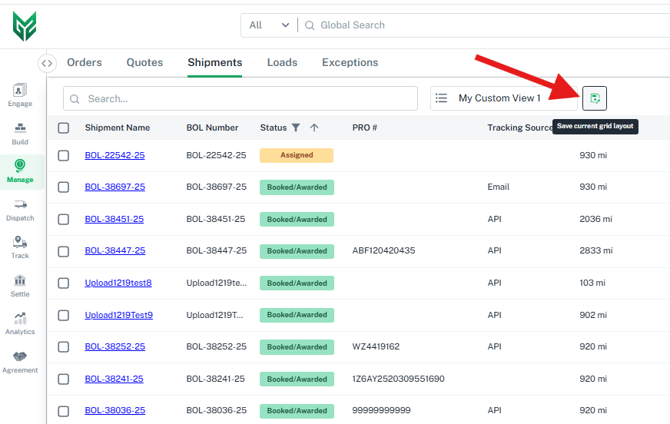
  • Persistent Column Customization: Adjust column widths and positions to fit your specific needs. These changes are now saved to the "Grid State," meaning your layout remains intact even after you log out and back in.

  • Sticky Filters and Navigation: Move seamlessly between the main grid and the BOL Detail or Financial Detail views. Your active filters and sorts will no longer reset when you click back into the sidebar or main list.

  • New action button to save your current grid layout: Located next to the view name at the top of each grid. 


Behavior at a Glance

  • Resize/Move Columns: Automatically saved to current view
  • Enter/Exit Detail Views: All filters, sorts, and layouts are maintained
  • Click "Refresh": Resets the grid to the default view state
  • Log Out & In: Your last saved view and column sizes are restored

G2M-4008: Seamless Navigation Between Cost  and Charge records

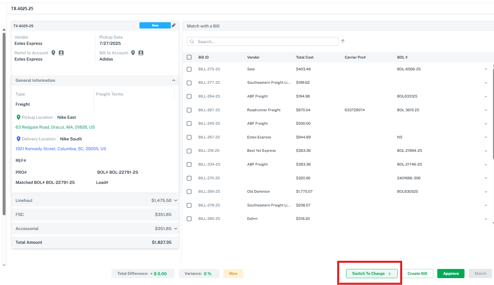
  • New buttons added to the cost and charge screens allowing users to switch to the corresponding charge or cost record. This update allows for easy cross-referencing of associated invoices and costs, which is especially helpful for brokers who want to ensure both their carrier bills are paid along with the associated customer invoice.
  • Reference the screenshot below showing a Cost record, there is a new button titled 'Switch to Charge'. When clicked, this will take the user directly to the associated charge record screen. A similar action button is also found on the Charge record named 'Switch to Cost'


G2M-3347: Customized Invoice and Statements for Receivables.(DRAFT)

This update introduces the ability to set up templates for sending Invoices and enables brokers to set specific templates at the client level, allowing you to create and select the version that best fits your business.

Key Customization Features

The new template includes three configurable sections, giving you more control over the information your customers see:

  • Set custom Reply-To Emails

  • Additional Remit To Information: Clearly define where payments should be sent with a dedicated space for secondary payment instructions or bank details.

  • Customized Footer Notes: Add personalized closing messages, legal disclaimers, or "Thank You" notes at the bottom of every statement.

  • Customer Invoice Notes: Highlight specific details or internal references directly on the statement to reduce billing inquiries.

Add Screenshot....

G2M-4024: 3PL Service Agreements-New Fix Amount Retainer Fee

As a broker, you may need to invoice a customer a recurring fee that is not tied to a specific transaction such as a shipment or bill. This enhancement enables brokers to configure fixed retainer fees on a weekly or monthly basis for designated customers. These fees will appear on invoices as 3PL Service Fees. 

As with all 3PL Services agreements, a Client is required to identify the Bill To party, along with the billing frequency (Weekly, Monthly, Quarterly, or Yearly) and the fixed amount.

How it works?
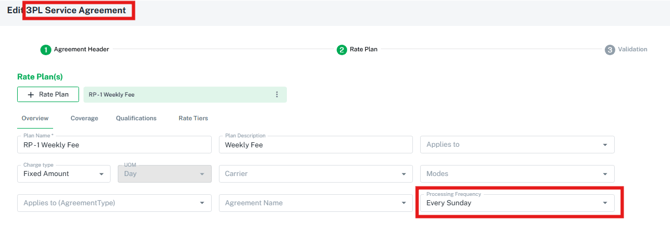
  1. Under Agreements> 3PL Services>Create New
  2. Enter Frequency and fixed amount, assign the specific client
  3. When the processing occurs (weekly on Sunday as example), the system will generate a new charge record for the specific client. The broker will then approve the charge to create the associated invoice.  
    1. Each customer will need to be assigned to a specific 3PL Agreement
    2. The charges will need to be approved by the broker to create the invoice
    3. These will appear in the Charge and Invoice grids as a 'Third Party Service' type


G2M-3919 Financial Grid Enhancements:

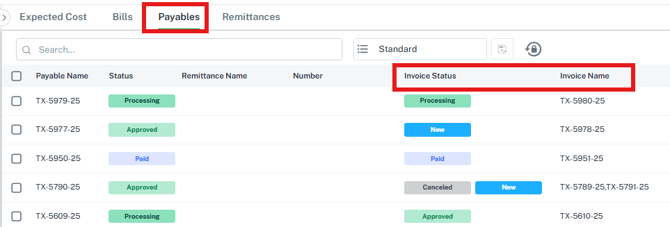
Payable Grid

  • Added 'MC number' associated to the carrier (if entered on the carrier account profile)
  • Added 'Invoice Status' and 'Invoice Name ' to allow users to quickly see the status and record ID of the associated client invoice record that is tied to the payable. 
  • Updated the Remit to address information to account for scenarios where a factoring company is used by the carrier

Invoices Grid

  • Added 'Payable Status' and 'Payable Name ' to allow users to quickly see the status and record ID of the associated cost record that is tied to the receivable 
  • Added 'Payment Reference' and 'Payment Method' columns


G2M-3881 Spot Quote & Tender Enhancements:

We have introduced Phase 1 of the new Spot and Tender capabilities to streamline communication between Shipper Guests and Brokers.

For Shipper Guests:

  • Spot Options Tab: Access enabled for Shipper Client Guest to request spot quotes and tenders directly from the broker.  This is particularly helpful for TL rate requests.

  • Carrier Visibility: Guests can only view the Broker in the new Spot Grid.

For Brokers:

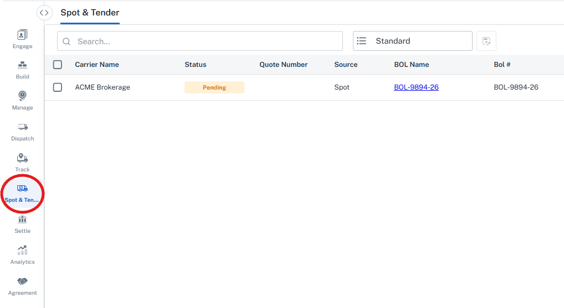
  • Spot & Tender Page: A new centralized dashboard to manage and respond to all incoming spot and tender requests from guests.

  • Tender Management: Accepting a tender should still be done through the email, not through the Grid (for now).  Financials are generated only upon the final award.


Carrier Related Enhancements and Improvements:

Release Note 

 New Carriers enabled for webservices: 

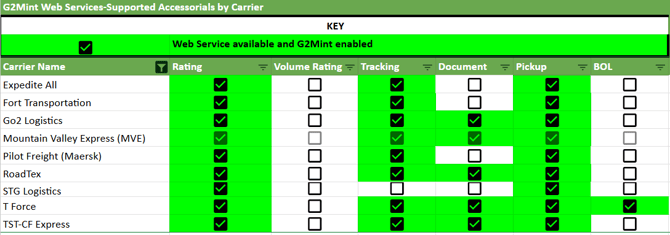
TST-CF Express, T-Force, STG Logistics, Mountain Valley Express, Go2 Logistics, 
Roadtex, Pilot Freight (Maersk), Fort Transportation, and Expedite All can now be enabled on your G2Mint account.
The below table provides the specific webservices supported by each carrier.  


Enabled New Carrier Invoice Integrations via EDI (210's):

G2Mint has enabled the ability to accept and process invoices from 4 additional carriers. 

TForce, Cross Country, Best Yet Express, and Central Transport 

Our Carrier Invoice integration enables customers to automate their carrier bill audit and approval process. Any customer shipping with these carriers can request configuration for invoice audit and approval automation.

We've addressed the following issues in this release:

Release Note 

G2M-3869: Addressed a scrolling issue when accessing certain dashboards and reports

G2M-3633: Added logic when building loads (combining multiple shipments with the same pick up and delivery locations) to display the earliest appointment time when 2 shipments added to a Load contain a different appointment. 

Provide Your Feedback:

Your input is invaluable as we continue to evolve. If you have any questions, suggestions, or encounter any issues, please don't hesitate to reach out to our support team at support@G2Mint.com

Thank you for being a valued customer!

Sincerely,

The G2Mint Team