Last Updated: May 2026
Applies to:
Primarily for Brokers (Note: Shippers can leverage the carrier bill audit portions and disregard the client invoice pieces in this article)
Common Scenario(s)/Challenge (s):
This article focuses on the general overview of how G2Mint allows customer to manage their carrier bills
Solution Overview:
Understanding G2Mint Data Architecture: How Shipment Records and Financial Records are related
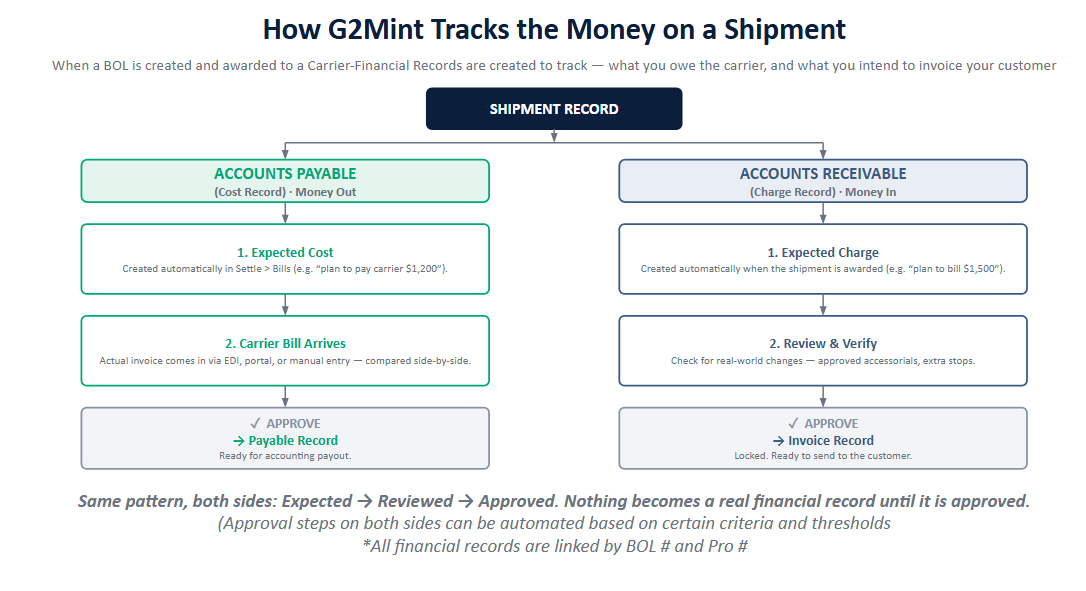
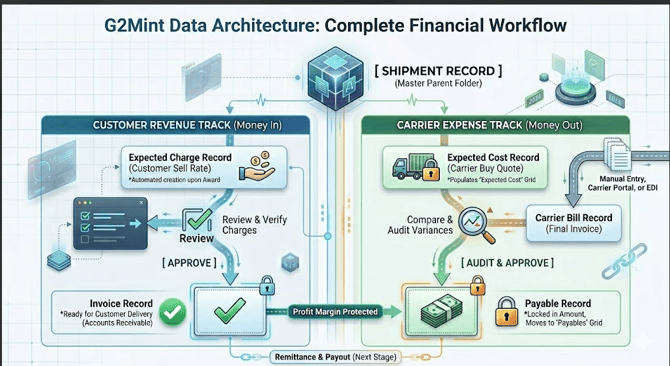
To understand how G2Mint manages your finances, it helps to think of a Shipment Record as a master parent folder. Inside this folder, G2Mint runs two parallel tracks simultaneously:
- The Carrier Track (Expenses / Money Out): Costs
- The Customer Track (Client Invoices/Revenue / Money In): Charges
Both tracks begin as temporary "Expected" placeholders. Once reviewed and approved, expected costs become your account payable records and expected charges account receivable records.
🟢 The Carrier Track: Expenses (Money Out)
This track manages what you owe the carrier, allowing you to catch errors before payouts are made.
- 1. Expected Cost Record: Upon awarding/tendering a BOL, G2Mint creates an Expected Cost record in your Settle > Bills > Expected Cost tab (e.g., "We expect this BOL to cost $1,200 based on the quote").
- 2. Carrier Bill Record: Once carrier sends their actual invoice—the Carrier Bill Record needs to match up to a BOL—Carrier bills can be submitted into G2Mint via EDI, the carrier portal, or manual entry or via API.
- 3. Match>Audit>Approve: You match the incoming Carrier Bill to your Expected Cost to review variances side-by-side (e.g., checking if an extra $100 detention charge is valid). This audit process determines the final amount you plan to pay your carrier.
- Note: With a bill integration, if everything matches up (Expected Costs vs. Billed Amount) this process is automated.
- 4. The Transformation (Approval): Once the expected costs and bill amount are audited, the Approve action is initiated, the Expected Cost record status updates to 'Approved' status. It instantly transforms into a permanent Payable Record, now found in the Payables grid, flagged as approved and ready for accounting payout.
G2Mint's structure enables the ability to track your Expected Costs (original quoted amount for the freight), the Carrier Billed Amount, and the Final Approved Payable (Final amount agreed to pay your carrier).
🔵 The Customer Track: Revenue (Money In)
This track manages what your customer owes you based on the agreed sell rate and any subsequent adjustments.
- 1. Expected Charge Record: The moment a shipment is awarded, G2Mint automatically creates an Expected Charge record tied to the BOL (e.g., "We plan to bill the customer $1,500 based on our quote").
- 2. Review & Verify: Before final billing, you have the ability to review and adjust the final amount to invoice based on potential changes between your expected costs and final approved costs from the carrier.
- 3. The Transformation (Approval): When you click Approve, the Expected Charge record transforms into an official Invoice Record. It is then locked and ready to be sent to the customer.