Last Updated: May 14, 2025
Applies to:
Shippers, Brokers, Carriers, and Partners
Solution Overview:
Analytics leverages our system's data to generate insightful reports and dashboards designed to enhance your sales, profitability, and operational efficiency. For users who are new to our system and may have limited data, G2Mint offers the option to download additional datasets. G2Mint comes equipped with default analytics views, and users have the flexibility to modify existing dashboards or create entirely new ones from scratch. Additionally, Admin Users can designate a preferred dashboard as the default view. G2Mint's analytics capabilities are powered by QuickSight. For more detailed information, please refer to the QuickSight documentation.
Considerations:
- Data in analytics refreshes hourly
- Only users designated as 'Authors' have the ability to create dashboards and reports
Step by Step:
Set a Default Dashboard view
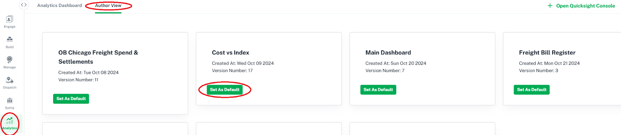
- Select Analytics from left Nav Bar
- Select Author View
- Select Set As Default for desired Dashboard
Edit an existing Dashboard template
- Select Analytics from left Nav Bar
- Select Author View
- Select Open Quicksite Console
- Find Dashboard to edit by searching left navigation bar
Upload data for a Dashboard/Analytics

- Select Analytics from left Nav Bar
- Select Author View
- Select Open Quicksite Console
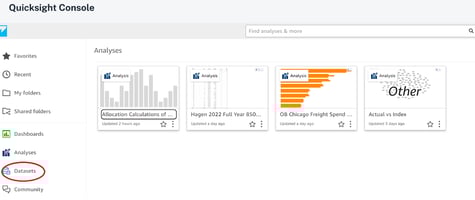
- Select Datasets from left navigation bar
- Select New Dataset
- Select the source of the file

Create a New Dashboard
- Select Analytics from left Nav Bar
- Select Author View
- Select Open Quicksite Console