Last Updated: Feb 2026
Applies to:
Shippers, Brokers, Carriers
Solution Overview:
The Dispatch section contains Shipments and Loads that are "ready to tender" and show them on one Grid. This includes Shipments or Loads in the following statuses:
- Booked/Awarded
- Assigned
- Pending Rates
- Rated
- Rating Failed
- Ready to Tender
- Dispatched
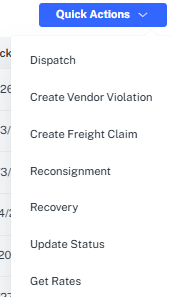
Additionally, several Quick Actions are available through Dispatch.
Quick Actions in Dispatch:
- Select the checkbox to the left of the desired BOL(s) from inside Dispatch
- Select Quick Actions
- Choose the appropriate action to take (Dispatch, Vendor Violation, Freight Claim, Reconsignment, Recovery, Update Status, Get Rates, Tender)
- Enter required information