Last Updated: October 2025
Applies to:
Shippers, Brokers
Common Scenario(s)/Challenge (s):
This article focuses on the general overview of how G2Mint allows customer to manage their carrier bills.
Solution Overview:
Managing your carrier bills is done in the Settle>Bills section. The Bills section features four distinct tabs—Expected Cost, Bills, Payables, and Remittances—each providing comprehensive tools for managing every facet of your carrier-related expenses.
Expected Cost: This is where you go to match your carrier bills to an expected cost, audit and approve the record to create a payable. When a Shipment is awarded, an Expected Cost is automatically created, mirroring the details from the awarded rate quote. Within this tab you can audit and approve your cost records. Users without a carrier bill integration can also create bills to match them to your expected cost records.
Note: Approved Expected Costs will no longer appear in this grid once it has been approved. All expected costs that have been approved will be found under the Payables grid.
Bills: This tab consolidates all carrier bills that have been either manually entered by your team in G2Mint, submitted directly by carriers through the G2Mint carrier portal, or received via our integrated EDI carrier bill solution.
Payables: This tab displays all approved expected cost records. Expected costs are typically matched to carrier bills—either manually or through integration. After matching, you can review variances and approve the final payable amount. Approved payables are presented in a focused grid, streamlining the management and tracking of carrier bill payments and remittances.
Remittances: Remittances allow you to consolidate multiple payables for the same carrier into a single payment record. Initiate a new Remittance directly from the Payables grid. Once created, the Remittance grid enables you to efficiently track and update remittance status, manage payment details—including method, check number, and amount—and maintain all relevant references in one place. Users can easily add or remove payables from an existing Remittance within this grid as needed.
How it works?
-
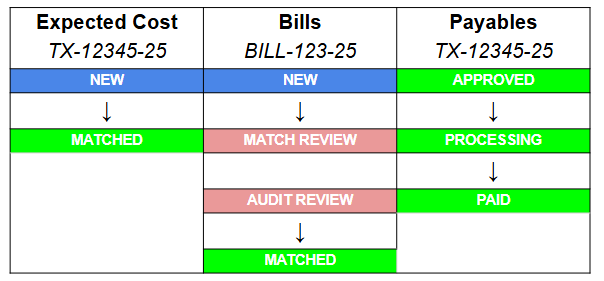
When a shipment is created, an expected cost record is also created.
-
Once an expected cost record is matched to a bill (submitted manually or created via an integration), the record can be audited and eventually approved.
-
After an expected cost record has been approved, it then moves over to the Payables grid.
The below table shows the key statuses of a cost record, carrier bill, and payable record. Reference this article for an explanation of each of these statuses.