Feature Highlights:
For Shipper Guests:
-
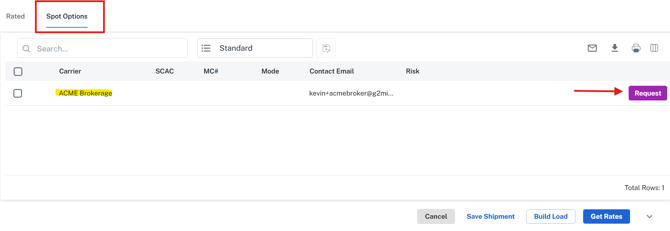
Spot Tab added to the Rate Draw screen: Access is enabled for Shipper Client Guest and Shipper Client Guest w/ Agreements personas to request spot quotes and tenders directly from the broker.
-
Shipper Guests can only request and view spot requests from the Broker by default.
-
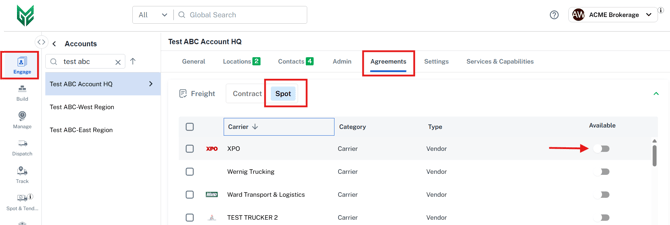
What if a broker wants to enable access for their shipper guest to send spot quotes directly to specific carriers? Specific carriers must be manually activated by the broker in the new Spot tab located in the Engage Client Account under the Agreements>Freight>Spot tab.
-
-
New Spot Grid: A dedicated section in the Client Account allows users to toggle carrier visibility (inactive by default).
For Brokers
-
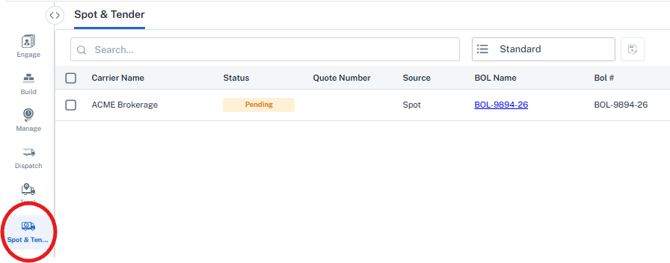
Spot & Tender Page: A new grid that will eventually enable the broker to manage and respond to all incoming spot and tender requests from guests.
-
Note: Currently, this grid is primarily used to see any pending requests waiting for the Broker to submit a rate via the email link received.
-
- Tender Management: Accepting a tender now locks all charges without immediately awarding the shipment. Financials are generated only upon the final award.
-
How to enable additional carriers for your Shipper Client? Go to Engage>Accounts>Agreements, there is a "Spot" tab under Agreements → Freight to manage which carriers are visible to for each specific Shipper Client account.
Note: By Default, a Shipper Guest will be given access to only submit a Spot to you, the Broker. To activate additional Carriers, it must be done on an account-by-account basis (Engage>Accounts>Select Shipper Account Name>Agreements>Freight>Spot>activate via the 'Availability' toggle option next to each of your Carriers).
How it works?
- Guest Shipper builds a Shipment or Load, selects 'Get Rates' and goes to the 'Spot' tab within the Rate Draw screen.
- Guest Shipper selects the 'Request' button to request a Spot Rate from the Broker.

- Broker sees the Spot Request and receives an email: Upon the Shipper Guest selecting 'Request', a Spot Request appears in the 'Spot & Tender' tab with a status of 'Pending' for the Broker and the specified broker contact(s) receive a request email with a link to enter a rate.
- The 'Spot & Tender' page is a collection of Spot Requests from Guest Shippers with a status of Pending. (All action by the broker must be taken via the email link to submit the rate-Future enhancements will enable additional options via the grid)
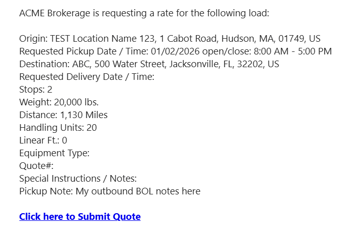
- The broker contact(s) with the contact type of 'Spot' (or the Default contact, if none assigned) receives an email requesting a Bid.
- Broker will need to enter the bid through the email link (future functionality will allow the Broker to enter the bid through the Spot & Tender grid as well). The required fields to Submit a Bid are Submitted By and Cost.
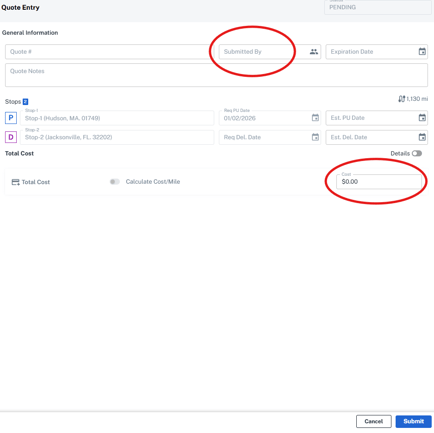
- Once the bid is entered by the Broker through the email link provided, the Shipment moves to the Manage>Shipments grid. The assigned Rate can be viewed in the Rate Drawer by the Shipper.

-
The Shipper can now 'Tender' the shipment, which will send an email to the Broker, allowing the Broker to accept the Tender to complete the Spot Quote process.