General Overview:
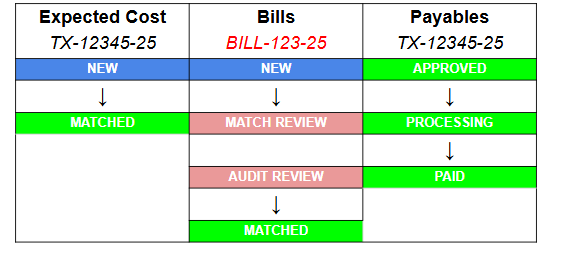
The below table shows a typical example of the 2 main records associated to carrier expense (Cost Records and Carrier Bill Records). Your cost records will appear in the expected cost grid or the payable grid depending on the status. Your Carrier bill records are found in the Bills grid and are eventually matched to a cost record (automatically or manually).
Expected Cost Statuses:
New: Expected Cost record occurs from a Cost record that has been Awarded to a Carrier or a manually created Expected Cost.
Matched: Status indicating that the Expected Cost has successfully matched to a Freight Bill. This Matched status occurs when the Expected Cost aligns to a carrier bill based on the defined matching rules.
Canceled: When a shipment was previously booked with a carrier and then cancelled or unawarded, the associated cost record for that carrier is cancelled.
Bills Statuses:
New: A bill that has been entered into G2Mint (Manually or via EDI, API, etc.) and not matched to a shipment.
Create options are:
· Manual entry of freight Bill
· Integration (EDI, API, etc.)
· Carrier Portal created
No Match: Indicates that the system could not identify a matching Shipment or Load.
Matched: A Bill that has been matched to a cost record. Bills can be matched manually by the user or if there is a carrier bill integration the system will attempt to match based on the BOL and Pro Number.
Multiple Matches: Freight Bill is a match to more than 1 Shipment or a Shipment is a match to more than 1 Bill. These require action by the user to determine the proper shipment to match. Potential matches will be shown, allowing the user to select the proper BOL.
Match Review: Bills that cannot be matched to a specific Shipment or Load and therefore require manual review and intervention by a user to complete the matching process.
Audit Review: Bill has matched to the Shipment but there is an issue with the amounts or tolerances where the variance is too great. These must be manually reviewed and approved.
Audit Complete: When a Bill has gone through an audit and an amount is approved, the process will create a Payable record with a status of "Approved" and the Bill status will change to "Audit Complete".
Canceled: Status manually set by a user to indicate the Freight Bill is no longer eligible for processing (i.e. shipment/load canceled)
Credited: If a Vendor Credit Memo is applied to a Bill, this “Credited” status should be used. It basically identifies that this Bill has a VCM applied to it that was likely issued by the vendor or carrier; in many cases, there may be accompanying documentation such as an actual hardcopy Credit Memo.
Rejected: User manually determined that Freight Bill was not acceptable for processing. The most common rejection is for a freight bill created that does not belong to the Account Owner.
Processing: Integration or any form or transmission or act of sending these records to Owning Account. *Note: If you are using the Denim plug in as your factoring company, after clicking the button 'Factor with Denim' invoices will move to this status. Records will remain in this status until Denim sends a response back to G2Mint saying it is complete. This will then update the status from Processing to Paid.
Paid: Financial system input (integration) or Manual entry of payment info will change the status to Paid.
Paid-Partial: Payment info shows that the freight bill was only partially paid. This only occurs if the System Approved a specific amount ($500) but the client inputs that a lesser amount was actually paid ($400).
Duplicate: A bill is only considered duplicate if it matches the same TYPE and TOTAL AMOUNT as a previous bill.
Draft: A “Draft” Bill is created when the Carrier goes to the “Billing” section within the Carrier portal. This will make it easier for the Carrier to submit the Bill.
Payables Status options:
Approved: Result of approving the Expected Cost…which creates the Payable record;
at this point, the Payable is “tied” to the Bill (i.e. Bill has all the information on locations, references, cargo, and billed amount…where the Payable record has my approved amount to pay.
Thus, from this point on…all Status of the Payable is also reflected on the associated Bill.
At this point, the EE, Bill, and Payable are all Locked
Processing: Payable information has been Sent to client. In the event we don’t have integration and Users are sending to client…the payables info outside of the system…a User can go in and manually change the Status to Sent
*Note: If you are using the Denim plug in as your factoring company, after clicking the button 'Factor with Denim' invoices will move to this status. Records will remain in this status until Denim sends a response back to G2Mint saying it is complete. This will then update the status from Processing to Paid.
Assigned: Assigned means that the invoice has been assigned to a Statement. The individual invoice record remains intact.
Canceled: Result of manually Canceling a payable (for phase 1)…if an AP is cancelled, then the Bill is reverted back to Audit Review
Paid: If payment record is entered or received
Paid Partial: Partial Paid is status shows if Payable not paid in full.
Remittances Status options:
New: Initial Status of Remittance resulting from "Create" action. A Remittance can only exist if at least 1 Approved AP is assigned to it.
Approved: Result of approving the Remittance and “locking” from being edited or manipulated.
Processing: Remittance has been Sent to client.
Canceled: If a Remittance is Cancelled, all APs on that Remittance will just revert back to being an individual AP, each with a status of Approved, and no Remittance # are associated it them.
Credited: Just as with a Bill, a vendor may issue a credit memo for the entire Remittance, which would apply a credit memo to each of the Bills on that Remittance.
Paid: Client has sent payment to the carrier/vendor on that Remittance and the payment is the full amount of the remittance. The Remittance record, as well as all the APs on that remittance, will get a Paid status…all referencing the payment info (Payment input of check #, check date, etc.).
Paid-Partial: Remittance is partially paid (client needs to make known what AP or bill # on that Remittance did not get paid or was partially paid).
Expected Charge Statuses:
New: Newly created Expected Revenue record; this can be done manually or is created after the “awarding” of a carrier with a cost and a markup
In Review: Manually set status to indicate a revenue record needs some attention before it can be approved
Matched: Newly created freight Charge “looks” for a matching Shipment in the system based on the Match & Tolerance settings, or this can be modified manually.
Disputed: Client is disputing the Charge; this may require additional actions. Payment terms are put on-hold at this point.
Audit Review: There is an issue with the amounts or tolerances where the variance is too great.
Invoice Statuses:
New: Approved Expected Charges can now generate an “invoice," so if one has been generated (there now exists an Invoice Number, Invoice Date, etc.), then the first Status for Invoice is “New”
Approved: An Approved Expected Charge is needed to create an Invoice and an Approved Invoice is needed in order to Print, or Send, or Assign to a Statement.
Billed: Either Digital Invoice or hardcopy Invoice was transmitted or sent (or emailed via the system) to the client. At this point, all sent records are Locked
Disputed: Client is Disputing the Invoice sent to them.
Paid: Invoice paid in full.
Paid Partial: Invoice paid, with a remaining balance.
Processing: Invoice has been Sent to client.
Ready To Invoice: Manual status signifying that an Invoice is ready to be sent.
Statement Statuses:
New: Initial Status of Statement resulting from Create action…a Statement can only exist if at least 1 Invoice is placed / assigned to it.
Approved: Result of approving the Statement
Paid: Client has paid the Statement in-full and the Statement, as well as all the Invoices will get a Paid status…all referencing the payment info (Payment input of check #, check date, etc.)
Paid Partial: Statement is partially paid but client needs to make known what invoices on that Statement did not get paid or was partially paid. This status can trigger a Balance Due Invoice to be generated.
Cancelled: Result of manually Cancel a Statement. If a Statement is Cancelled, all Invoices on that Statement will just revert back to being an individual Invoice…each with a status of Approved…and no Statement # are associated it them.