Last Updated: May 5, 2025
Applies to:
Brokers and Shippers
Common Scenario(s)/Challenge (s):
The Address Book is a place to store addresses that may be used yet are not correlated directly to a specific client or vendor.
Solution Overview:
The Address Book stores addresses for your clients' customers and streamlines your quoting and shipping processes. These pre-populated addresses save time and reduce errors by automating the inclusion of known shipment accessorials and hours of operation associated to that location. Note that while the Address Book enhances efficiency, it has less capacity for specifics than Engage Locations, as it cannot be associated with a particular Carrier, User, or Commodity.
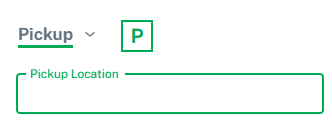
Functionally, Engage>Locations vs Address Book Locations can be differentiated in the Build sections when entering a Pickup or Delivery location. Selecting the boxed P or D will provide a picklist of Engage Locations associated with the chosen Account Name. Selecting Pickup (or Delivery) Location will offer a picklist of Engage Locations associated with the chosen Account Name AND Address Book locations assigned to the account.
How to utilize the Address Book:
- Click on "Configurations" gear icon
- Select "Address Book"
- Click “+ Create New”
- Location and Contact(s) fields are similar to those in My Account and Engage. Shippers and 3PL clients stored in your "Address Book" can have their address and contact information populated in any address field on the different builder screens (Quotes, Shipments, etc). Note: Each Address Book record will consist of one location and either one or multiple contacts.
Address Book Terms:
Account: Non-Required field which associates this Location to a specific account. If an account is selected, the address will only appear as option for that account. If left blank, the address is available to all accounts.
Location Name: Utilize a specific name that will associate to that location (required)
Location ID: Enter a unique location code/ID, which may help with future Integrations. If a location ID field is used for an integration, the ability to edit this field becomes restricted and can only be edited by your superuser.
Address: Enter specific residential or commercial address of Location (required)
Location Accessorials: Each location can have specific accessorials associated with it to streamline building quotes or enforcing specific location standard accessorials.
Latitude/Longitude: Auto populates with address and can be used for visual purposes in the map screen when building and managing your shipments.
Location Notes: Internal Notes are only visible to your organization while External Notes are used to provide actionable and relevant information on BOLs or Quotes.
Location Details:
- Hours of Operation: Configure (in our Configurations section) the operating hours for both pickup and delivery locations. This information will be displayed on shipments to assist with scheduling.
- # of Docks: For information only purposes.
- Appointment Required: Check box if this Location requires an appointment rather than a First Come, First Serve option.
- First Come, First Serve: Check this box if Location works on a First Come, First Serve basis rather than appointment.
FAQ: